LlamaIndex
In short: LlamaIndex is a library focused on connecting your own documents to an LLM: load, split, index, retrieve and answer.
On this page
Level: Beginner · Reading time: 10 min · Phase: 5 — Frameworks
Before you start: You should know the basic RAG idea of retrieve-then-answer (What is RAG) and what chunking is (Chunking).
Explain it like I'm new
Imagine a librarian. You hand over a pile of documents. The librarian files them, and when you ask a question, fetches the right pages and reads them to answer you. LlamaIndex is that librarian, written as code.
It is data-centric. Where LangChain is a general toolbox, LlamaIndex puts the document pipeline first: many loaders, many chunking strategies, many index types, and query engines on top.
Words to know:
- Document — a raw source (a PDF, a web page) with metadata.
- Node — a chunk of a document. (Not the same as a graph node.)
- Index — a data structure over nodes. The common one is a vector index.
- Retriever — fetches the top-k nodes for a query.
- Response synthesizer — builds the prompt from retrieved nodes and calls the LLM.
- Query engine — retriever plus synthesizer: question in, answer out.
- Chat engine — a query engine with conversation memory.
- Embed — turn text into a list of numbers so that similar meanings end up close together (Embeddings).
- Top-k — the k best matches. With
k=1you keep only the single best one.
Watch it
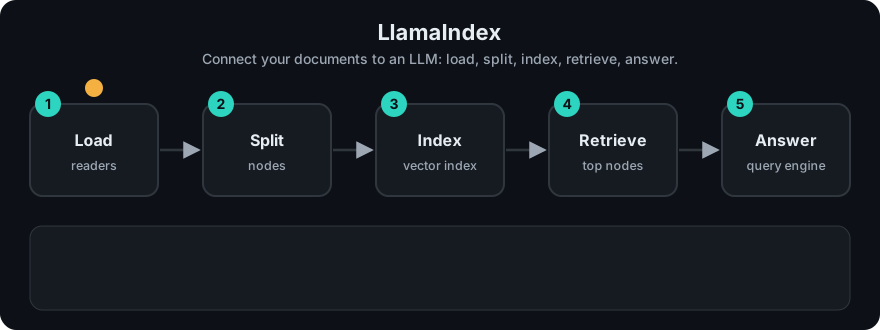
It plays on a loop. Read the caption in the box, one step at a time. Want to go at your own pace? Step through it with Previous and Next.
How it works
- Load documents.
- Split into nodes (chunks).
- Embed each node and store the vectors in the index.
- At query time, embed the question, fetch top-k nodes.
- Put the nodes in a prompt and ask the LLM.
flowchart LR
    D[documents] --> N[split into nodes] --> E[embed] --> X[(vector index)]
    Q[question] --> R[retriever] --> X
    R --> S[synthesizer + LLM] --> A[answer]
Mapping: this is the RAG pipeline from Phase 1 with each stage named. Advanced options (re-ranking, hybrid search) are in Phase 2.
Worked example
The code example below is a tiny stand-in for a query engine. It scores documents by how many words they share with the question, instead of using embeddings. I ran it. Here are the steps.
- Documents:
"Paris is the capital of France."and"The Nile is a river in Africa." - Question:
"capital of France?". Its words arecapital,of,france?. - Retriever step. Document 1 shares
capitalandof, so its score is 2. Document 2 shares onlyof, so its score is 1. (The?stays attached tofrance?, so it does not matchfrance.. Real engines tokenize better.) - With
k=1, we keep the top document: the Paris one. - Synthesizer step: it builds this prompt. A real engine would send it to an LLM.
Context:
Paris is the capital of France.
Question: capital of France?
So the "retriever" picked the right page, and the "synthesizer" wrapped it into a prompt. For the real library calls, check the current docs for exact imports.
Code example
From scratch, stdlib only: word-overlap retrieval standing in for embeddings.
docs = ["Paris is the capital of France.", "The Nile is a river in Africa."]

def score(q, d):
    return len(set(q.lower().split()) & set(d.lower().split()))

def query_engine(question, k=1):
    top = sorted(docs, key=lambda d: score(question, d), reverse=True)[:k]
    prompt = "Context:\n" + "\n".join(top) + f"\nQuestion: {question}"
    return prompt   # a real engine would send this to an LLM

print(query_engine("capital of France?"))
In real projects (pip install llama-index, needs an API key for the default models):
from llama_index.core import VectorStoreIndex, SimpleDirectoryReader

documents = SimpleDirectoryReader("data").load_data()
index = VectorStoreIndex.from_documents(documents)
query_engine = index.as_query_engine()
print(query_engine.query("What does the report say about revenue?"))
Defaults hide the embedding model, chunk size and top-k. Read the docs and set them on purpose.
When to use it / when not to
- Use it when the main job is question answering over many documents or file types.
- Use it when you want ready loaders and index types without writing them.
- Skip it for a tiny corpus (a few pages fit in one prompt).
- Skip it if you need full control of chunking and ranking and prefer your own 100 lines.
Common mistakes
- Trusting default chunk size for every document type.
- Not checking which nodes were retrieved before blaming the LLM.
- Re-indexing on every run instead of persisting the index.
- Mixing up "node" here with "node" in graph frameworks.
- Expecting the index to answer questions. The index only finds nodes. The LLM writes the answer from them.
Recap
If you remember only three things:
- LlamaIndex is built for one job: connect your own documents to an LLM by loading, splitting, indexing, retrieving and answering.
- It gives you ready loaders and index types, so you write less glue code for question answering over many files.
- For a tiny corpus that fits in one prompt, or when you want full control of chunking and ranking, your own short code is simpler.
Interview questions
- What is a query engine? <details><summary>Answer</summary>A retriever plus a response synthesizer. It takes a question, fetches relevant chunks and asks the LLM to answer from them.</details>
- LlamaIndex vs LangChain? <details><summary>Answer</summary>LlamaIndex centres on data ingestion and retrieval over documents. LangChain is a broader toolbox for chains and integrations. They overlap and can be combined.</details>
- What does "node" mean in LlamaIndex? <details><summary>Answer</summary>A chunk of a document with metadata and relationships, the unit that is embedded and retrieved.</details>
Go deeper
- https://docs.llamaindex.ai/
Prev: LangGraph · Next: OpenAI Agents SDK · Back to phase: Phase 5