OpenAI Agents SDK
In short: The OpenAI Agents SDK is a small Python library with three main ideas: an Agent (model plus instructions plus tools), a Runner that runs the agent loop, and handoffs between agents.
On this page
Level: Intermediate · Reading time: 11 min · Phase: 5 — Frameworks
Before you start: You should understand what a tool call is (Tool calling) and the agent loop (Agent loops).
Explain it like I'm new
Think of a help desk. A front-desk person answers simple questions and, for billing, passes you to a billing specialist. Each person has a role (instructions) and a set of things they can do (tools). The SDK models this directly.
It keeps the number of concepts low. You do not write the loop. The Runner calls the model, runs any tools it asks for, feeds results back, and stops when the model gives a final answer.
Words to know:
- Agent — a model, instructions (system prompt) and a list of tools.
- Tool — usually a Python function; its signature and docstring describe it to the model.
- Runner — runs the loop until a final output.
- Handoff — one agent passes the conversation to another.
- Guardrail — a check on inputs or outputs that can stop a run.
- Tracing — a record of each model call and tool call in a run.
- Session — stored conversation history (memory) across runs.
- System prompt — standing instructions given to the model before the user's message.
- Docstring — the text in triple quotes under a Python function that explains what it does.
Watch it
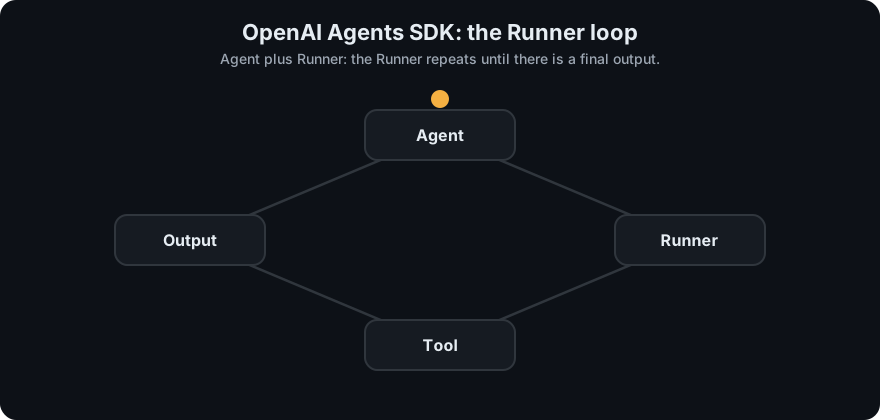
It plays on a loop. Read the caption in the box, one step at a time. Want to go at your own pace? Step through it with Previous and Next.
How it works
- You define an agent with instructions and tools.
- The Runner sends the input and tool descriptions to the model.
- If the model asks for a tool, the Runner executes it and appends the result.
- If the model asks for a handoff, the Runner switches the active agent.
- Otherwise the reply is the final output.
flowchart TD
    U[user input] --> R{Runner loop}
    R --> M[model]
    M -->|tool call| T[run tool] --> R
    M -->|handoff| H[switch agent] --> R
    M -->|final text| O[output]
Mapping: this is the ReAct-style agent loop from Phase 4, packaged. Handoffs are the multi-agent routing pattern. Sessions are conversation memory.
Worked example
The scripted fake model in the code example below plays the role of the real LLM. I ran it with the input "What time is it in Paris?". Here is the message list at each turn.
- Start:
messages = [user: "What time is it in Paris?"]. - Turn 1. The last message is from the user, so the fake model replies
{"tool": "get_time", "args": {"city": "Paris"}}. That is a request to run a tool. - The runner calls
get_time(city="Paris"), which returns"12:00 in Paris". It appendstool: "12:00 in Paris"to the messages. - Turn 2. The last message is now from the tool, so the model replies
{"final": "It is 12:00 in Paris"}. - The runner sees
finaland returns it. The printed output isIt is 12:00 in Paris.
The loop took 2 turns. max_turns=5 would have stopped it with an error if the model kept asking for tools. A real SDK does the same, with a real model. Check the current docs for exact imports.
Code example
From scratch, stdlib only, with a scripted fake model:
def get_time(city): return f"12:00 in {city}"
TOOLS = {"get_time": get_time}

def fake_model(messages):
    if messages[-1]["role"] == "user":
        return {"tool": "get_time", "args": {"city": "Paris"}}
    return {"final": "It is " + messages[-1]["content"]}

def run(user_input, max_turns=5):
    messages = [{"role": "user", "content": user_input}]
    for _ in range(max_turns):
        out = fake_model(messages)
        if "final" in out:
            return out["final"]
        result = TOOLS[out["tool"]](**out["args"])
        messages.append({"role": "tool", "content": result})
    raise RuntimeError("too many turns")

print(run("What time is it in Paris?"))   # It is 12:00 in Paris
In real projects (pip install openai-agents, needs OPENAI_API_KEY):
from agents import Agent, Runner

agent = Agent(name="Assistant", instructions="You are a concise assistant.")
result = Runner.run_sync(agent, "Write a haiku about recursion.")
print(result.final_output)
Tools, handoffs and guardrails are added through Agent options; see the docs for the current forms.
When to use it / when not to
- Use it for tool-using agents and simple multi-agent handoffs with little code.
- Use it when you want built-in tracing.
- Skip it if you need complex branching or durable state; a graph framework fits better.
- Check provider support in the docs if you do not use OpenAI models.
Common mistakes
- Vague tool docstrings. The model chooses tools from them.
- No turn limit.
- Giving one agent too many tools instead of splitting roles.
- Skipping guardrails on tools that change data.
- Mixing up a tool with a handoff. A tool runs a function and returns a result to the same agent. A handoff passes the conversation to a different agent.
Recap
If you remember only three things:
- Three ideas: an Agent (model plus instructions plus tools), a Runner that runs the loop, and handoffs that pass work to another agent.
- It is a good fit for tool-using agents and simple handoffs with little code, and it has built-in tracing.
- For complex branching or durable saved state, a graph framework fits better. Check the docs if you use non-OpenAI models.
Interview questions
- What does the Runner do? <details><summary>Answer</summary>It runs the agent loop: call the model, execute requested tools, apply handoffs, and stop at a final output or turn limit.</details>
- What is a handoff? <details><summary>Answer</summary>Transfer of the conversation from one agent to a more suitable agent, such as triage to billing.</details>
- Why have tracing? <details><summary>Answer</summary>Agent runs are multi-step and non-deterministic. A trace of each call lets you find which step went wrong.</details>
Go deeper
- https://openai.github.io/openai-agents-python/
Prev: LlamaIndex · Next: CrewAI · Back to phase: Phase 5