What is RAG?
In short: RAG (Retrieval-Augmented Generation) means you first find the relevant pieces of your own documents, then give only those pieces to a language model so it answers from them.
On this page
Level: Beginner · Reading time: 8 min · Phase: 1 — RAG Foundations
Before you start: Nothing, this is a starting point.
Explain it like I'm new
Think of an open-book exam. A student who studied a year ago (the model) knows a lot, but not your company handbook or last week's release notes. RAG hands the student the right two pages from the book before they answer, and asks them to point at the line they used.
A large language model (LLM) is a program trained on a huge amount of text that predicts the next word. It only knows what was in its training data, up to a cut-off date. It does not know your private files. When it does not know, it may still produce a confident answer that is wrong. This is called a hallucination.
Retrieval means searching a collection and getting back the most relevant items. Generation means the LLM writing text. RAG joins the two: retrieve first, generate second. The model now has evidence in front of it, and you can show the user which source each sentence came from (a citation).
Why not paste every document into the prompt? Prompts have a size limit (the context window), long prompts cost more and are slower, and models are worse at using facts buried in the middle of very long inputs (see "Lost in the Middle" below). Retrieval keeps the prompt small and focused.
Words to know:
- LLM (large language model): a program that writes text by predicting the next word.
- Retrieval: searching a collection and returning the most relevant items.
- Chunk: a small piece of a document, such as a paragraph.
- Vector / embedding: a list of numbers that stands for the meaning of a text.
- Vector database: storage that can quickly find the vectors closest to a given vector.
- Top-k: the k best matches, for example the top 2.
Watch it
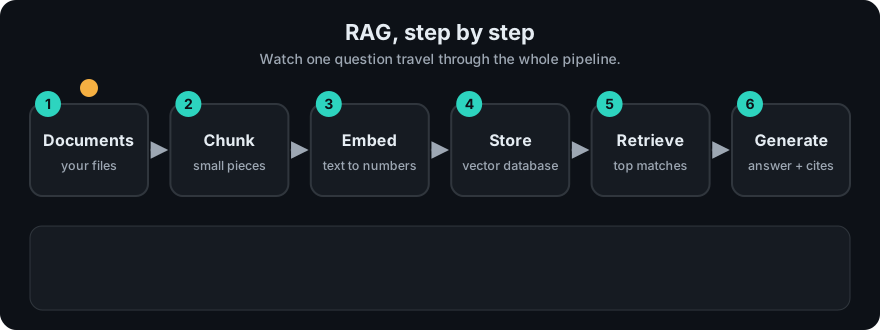
It plays on a loop. Read the caption in the box, one step at a time. Want to go at your own pace? Step through it with Previous and Next.
How it works
RAG has two phases.
Ingest (once per document)
- Load the document (PDF, web page, Markdown).
- Split it into small pieces called chunks.
- Turn each chunk into a list of numbers called an embedding (a vector) that captures its meaning.
- Store the vectors, the chunk text and some metadata (source, page, date) in a vector database.
Answer (every question)
- Turn the question into a vector with the same embedding model.
- Find the chunks whose vectors are closest to the question vector (top-k).
- Put those chunks into a prompt: "Answer only from these sources and cite them."
- The LLM writes the answer with citations.
flowchart LR
  subgraph Ingest
    D[Documents] --> C[Chunk] --> E[Embed] --> V[(Vector DB)]
  end
  subgraph Answer
    Q[Question] --> QE[Embed question] --> S[Search top-k]
    V --> S --> P[Prompt with sources] --> L[LLM] --> A[Answer + citations]
  end
Worked example
The repo demo has a few tiny documents. We ask: "Why use multi-stage builds?" Here is what each step does.
- Ingest (already done): the Docker notes were split into chunks, each chunk was turned into a vector, and all vectors were stored in an index (the searchable store the program builds).
- Embed the question: the question becomes a vector with the same method.
- Search: the program compares the question vector with every chunk vector and keeps the closest one.
- Generate: the best chunk goes into the prompt as evidence. Offline, with no LLM, the demo just prints it.
Real output:
[1] (docker.txt) Multi-stage builds compile an application in one stage and copy only the final artifact into a small runtime image. This keeps production images small and reduces the attack surface. Docker Compose describes several services in one YAML file and starts them together.The [1] is the top match, and docker.txt is its source, which is what a citation points to. The chunk also contains an unrelated sentence about Docker Compose, a sign that chunk size matters (see Chunking).
Code example
This repo already has the full loop in one file: code/mini_rag.py. The core is four steps:
from mini_rag import DOCS, Index, answer

index = Index(DOCS)                                   # chunk + embed + store
question = "Where should refresh tokens be stored?"
hits = index.search(question, k=2)                    # retrieve
for score, source, text in hits:
    print(f"{score:.2f} {source}: {text[:60]}...")
print(answer(question, hits))                         # generate (or print best chunk offline)
Run it: cd 01-rag-foundations/code && python mini_rag.py "Why use multi-stage builds?"
In real projects (LangChain + Chroma, needs pip install langchain-chroma langchain-openai and an API key):
from langchain_chroma import Chroma
from langchain_openai import OpenAIEmbeddings

store = Chroma.from_texts(texts=chunks, embedding=OpenAIEmbeddings(), metadatas=metas)
docs = store.similarity_search("Where should refresh tokens be stored?", k=3)
When to use it / when not to
- Use RAG when answers must come from documents the model has not seen: internal wikis, contracts, product docs, support tickets.
- Use it when facts change often. You update the index, not the model.
- Use it when users need citations they can check.
- Do not use it for tasks that need no outside facts (rewriting tone, summarising text the user already pasted).
- If you need the model to learn a style or format, fine-tuning may fit better. RAG adds knowledge; fine-tuning changes behaviour.
| Need | RAG | Fine-tuning | Long prompt |
|---|---|---|---|
| Private, changing facts | Good | Poor (retrain each change) | OK for small sets |
| Citations | Easy | Hard | Possible |
| Cost per query | Low | Low | High for big docs |
Common mistakes
- Skipping evaluation, so you cannot tell if a change helped or hurt.
- Not telling the model to say "I don't know" when the sources do not contain the answer.
- Bad chunking: pieces too big (vague matches) or too small (no context).
- Using a different embedding model for questions than for documents.
- Applying user permissions after generation instead of before retrieval.
Recap
If you remember only three things:
- RAG means retrieve the relevant chunks first, then let the LLM answer from them.
- Ingest happens once per document; every question then embeds the question, searches, builds a prompt and generates.
- RAG reduces hallucinations and gives citations, but it does not remove wrong answers.
Interview questions
1. Why use RAG instead of putting all documents in the prompt? <details><summary>Answer</summary> Context windows are limited, long prompts cost more and are slower, and models use facts in the middle of long inputs less reliably. Retrieval sends only the few relevant chunks, which is cheaper, faster and easier to cite. </details>
2. What are the two phases of a RAG system? <details><summary>Answer</summary> Ingestion (load, chunk, embed, store with metadata) runs when documents change. Query time (embed question, retrieve top-k, build prompt, generate with citations) runs on every question. </details>
3. Does RAG remove hallucinations? <details><summary>Answer</summary> No. It reduces them by giving evidence, but the model can still ignore or misread sources, and retrieval can return the wrong chunks. You still need grounding instructions, citations and evaluation. </details>
Go deeper
- Lewis et al., Retrieval-Augmented Generation for Knowledge-Intensive NLP Tasks — https://arxiv.org/abs/2005.11401
- Liu et al., Lost in the Middle: How Language Models Use Long Contexts — https://arxiv.org/abs/2307.03172
Prev: Phase 1 overview · Next: Embeddings · Back to phase: Phase 1