Embeddings
In short: An embedding is a list of numbers that represents the meaning of a piece of text, so that texts with similar meaning get similar numbers.
On this page
Level: Beginner · Reading time: 9 min · Phase: 1 — RAG Foundations
Before you start: What is RAG?. You should know that RAG searches chunks of documents and that the search compares numbers, not words.
Explain it like I'm new
Imagine a big map of a city where every sentence has an address. Sentences about "dogs" live in one neighbourhood, sentences about "taxes" live across town. "My puppy chewed my shoe" and "The dog ate my sneaker" live on the same street, even though they share almost no words. An embedding is that address.
The address is a vector: an ordered list of numbers, like [0.12, -0.40, 0.88, ...]. Each number is one dimension. A map has 2 dimensions (x and y). Text embeddings usually have hundreds or thousands of dimensions. You cannot picture that, but the maths works the same way as on a flat map.
An embedding model is a neural network trained so that related texts land close together. It is a different model from the chat LLM. You call it once per chunk when you ingest, and once per question when you search.
Because "close" means "similar in meaning", embeddings let search find matches that share no exact words. That is the main reason RAG systems use them.
Words to know:
- Vector: an ordered list of numbers, such as
[1, 2]. - Dimension: one position in a vector.
[1, 2]has 2 dimensions. - Embedding: a vector that stands for the meaning of a text.
- Embedding model: the trained neural network that turns text into an embedding.
- Cosine similarity: a score for how closely two vectors point the same way (1.0 means same direction).
- Normalize: rescale a vector so its length is 1.
Watch it
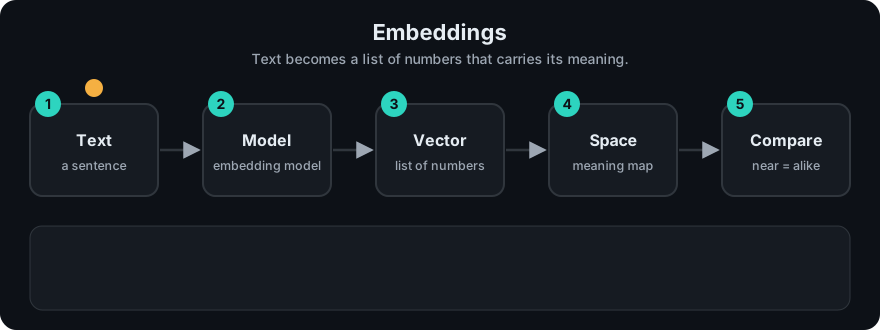
It plays on a loop. Read the caption in the box, one step at a time. Want to go at your own pace? Step through it with Previous and Next.
How it works
- Text goes into the embedding model. The model first splits it into tokens (word pieces; see Tokenization).
- The model processes the tokens and outputs one vector for the whole text (often by averaging token vectors, called pooling).
- Many models then normalize the vector so its length is 1. This makes comparison simpler.
- To compare two texts, you compare their vectors with a similarity measure such as cosine similarity.
"refresh token storage"  --> [ 0.21, -0.05,  0.77, ... ]  \
                                                           >  cosine = 0.83 (close)
"where to keep tokens"   --> [ 0.19, -0.11,  0.70, ... ]  /

"docker image layers"    --> [-0.52,  0.64,  0.02, ... ]  -> cosine = 0.08 (far)
Tiny worked example in 2 dimensions: a = [1, 2], b = [2, 4], c = [2, -1]. a and b point the same way (cosine 1.0). a and c are at a right angle (cosine 0.0, because 1·2 + 2·(−1) = 0).
Worked example
The repo's rag_vector_math.py uses 3-number vectors: a=[1,2,3], b=[2,4,6], c=[3,0,-1]. Real output:
dot(a,b)       = 28
cos(a,b)       = 1.0
dot(a,c)       = 0
cos(a,c)       = 0.0
Check by hand: multiply position by position and add. For a and b: 1·2 + 2·4 + 3·6 = 28. For a and c: 1·3 + 2·0 + 3·(−1) = 0.
What matters is direction. b is just a stretched to twice the length, so they point the same way and cosine is 1.0. c is at a right angle to a, so cosine is 0.0.
For text, read it the same way. "refresh token storage" and "where to keep tokens" get vectors pointing almost the same way (high cosine), while "docker image layers" points elsewhere (low cosine).
Code example
Real embedding models need a download, so this stdlib demo fakes one with bag-of-words counts. It shows the shape of the idea (text → vector → compare), not real meaning.
import math, re
from collections import Counter

VOCAB = ["token", "refresh", "cookie", "docker", "image", "layer"]

def embed(text):
    words = Counter(re.findall(r"[a-z]+", text.lower()))
    v = [words[w] for w in VOCAB]
    n = math.sqrt(sum(x * x for x in v)) or 1.0
    return [x / n for x in v]                     # normalized to length 1

def cosine(a, b):
    return sum(x * y for x, y in zip(a, b))       # for unit vectors, dot == cosine

q = embed("refresh token in a cookie")
print(cosine(q, embed("store the refresh token in an httpOnly cookie")))  # high
print(cosine(q, embed("docker image layer caching")))                   # 0.0
Bag-of-words fails on synonyms ("puppy" vs "dog"). Real embedding models solve that.
In real projects (pip install sentence-transformers, runs locally after a one-time model download):
from sentence_transformers import SentenceTransformer

model = SentenceTransformer("all-MiniLM-L6-v2")      # 384 dimensions
vecs = model.encode(["The dog ate my sneaker", "My puppy chewed my shoe"],
                    normalize_embeddings=True)
print(vecs.shape, float(vecs[0] @ vecs[1]))           # (2, 384) and a high similarity
When to use it / when not to
- Use embeddings when users phrase questions differently from the documents (paraphrases, synonyms, other languages for multilingual models).
- Pair with keyword search (see Hybrid Search) when exact terms matter: product codes, error IDs, names.
- Pick a model trained for retrieval. Check its maximum input length; text past the limit is cut off.
| Choice | Smaller model | Larger model |
|---|---|---|
| Speed / cost | Faster, cheaper | Slower, more memory |
| Vector size | Fewer dimensions, less storage | More dimensions |
| Quality | Often good enough | Often better on hard queries |
Common mistakes
- Embedding questions and documents with different models (their vector spaces do not match).
- Changing the embedding model without re-embedding every stored chunk.
- Feeding text longer than the model's input limit, so the end is silently dropped.
- Assuming a high similarity score means the chunk contains the answer. It means "related topic".
Recap
If you remember only three things:
- An embedding is a vector (a list of numbers) that places a text on a "meaning map".
- Texts with similar meaning get vectors that point the same way, so cosine similarity is high.
- Use the same embedding model for documents and questions, and re-embed everything if you change models.
Interview questions
1. What is an embedding? <details><summary>Answer</summary> A fixed-length vector produced by a trained model so that texts with similar meaning are close together under a similarity measure such as cosine. </details>
2. Why can't you mix embeddings from two different models? <details><summary>Answer</summary> Each model learns its own coordinate system. Dimension 17 in one model means nothing in the other, and the vectors may even have different sizes, so distances between them are meaningless. </details>
3. Why do many pipelines normalize embeddings? <details><summary>Answer</summary> For unit-length vectors, dot product equals cosine similarity and ranks the same as Euclidean distance, so you can use the fastest operation and get consistent results. </details>
Go deeper
- Reimers & Gurevych, Sentence-BERT — https://arxiv.org/abs/1908.10084
- Muennighoff et al., MTEB: Massive Text Embedding Benchmark — https://arxiv.org/abs/2210.07316
- Mikolov et al., Efficient Estimation of Word Representations in Vector Space (word2vec) — https://arxiv.org/abs/1301.3781
Prev: What is RAG? · Next: Tokenization · Back to phase: Phase 1