LangChain
In short: LangChain is a Python library of building blocks (prompts, models, parsers, retrievers, tools) that you join together with a pipe operator.
On this page
Level: Beginner · Reading time: 11 min · Phase: 5 — Frameworks
Before you start: You should know what an LLM API call is (Calling an LLM API) and the basic RAG idea (What is RAG).
Explain it like I'm new
Think of a kitchen assembly line. One person chops, one cooks, one plates. Each does one job and hands the result on. LangChain gives you the stations. You decide the order.
Without a framework, you write the glue yourself: build a prompt string, call the model's API, parse the reply. LangChain wraps each of those steps in a common interface so they snap together and so you can swap one part (say, the model provider) without rewriting the rest.
Words to know:
- Runnable — any step with the same interface (
invoke,batch,stream). - Prompt template — a string with
{placeholders}filled from a dict. - Chat model — a wrapper around a provider's LLM API.
- Output parser — turns the model's reply into a string, JSON or an object.
- LCEL (LangChain Expression Language) — the
a | b | csyntax that builds a chain of runnables. - Retriever — a runnable that takes a query and returns documents (Phase 1).
- Tool — a function the model may ask to call (Phase 4).
- API — a way for your code to send a request to a service (here, an LLM provider) and get a reply back.
- Pipe operator (
|) — in Python it can be given a custom meaning. Herea | bmeans "run a, then feed its output into b". - invoke / batch / stream — run the step once, run it on a list of inputs, or get the reply piece by piece as it is produced.
Watch it
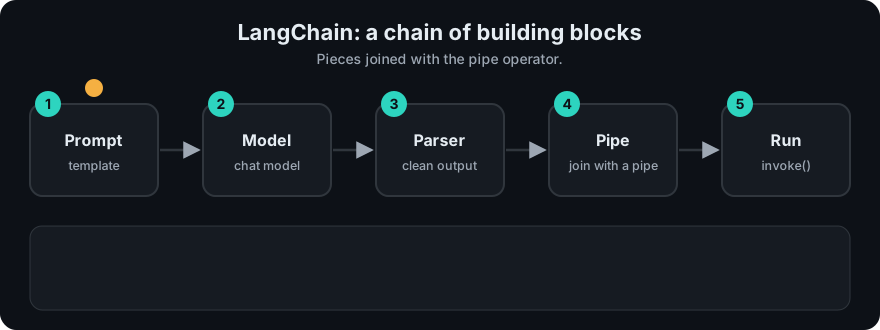
It plays on a loop. Read the caption in the box, one step at a time. Want to go at your own pace? Step through it with Previous and Next.
How it works
- Input dict goes into the prompt template, which produces messages.
- The chat model turns messages into a reply.
- The parser converts the reply into the final value.
flowchart LR
    I[input dict] --> P[prompt] --> M[chat model] --> O[output parser] --> R[result]
Mapping to earlier phases: a RAG chain is retriever | format docs | prompt | model | parser — exactly the pipeline from Phase 1. An agent is a loop around a model with tools — Phase 4. LangChain's own agent loop is built on LangGraph.
Worked example
Here is one input travelling through the three-step chain from the repo's offline demo (fw_mini_chain.py). The "model" is a fake that echoes the last word in capitals, so we need no network or key. I ran this and pasted the real values.
| Step | What goes in | What comes out |
|---|---|---|
| Start | {'letter': 'a'} | (the input dict) |
| Prompt template | {'letter': 'a'} | 'Name a fruit starting with a please apple' |
| Fake model | that prompt string | 'ANSWER: APPLE' |
| Output parser | 'ANSWER: APPLE' | 'APPLE' |
The final result of chain.invoke(...) is APPLE. Each step only knew about its own input and output. The | just passed each result to the next step.
With a real model, only the middle row changes: a provider's reply replaces the fake one. Check the current docs for exact imports and package names.
Code example
From scratch, stdlib only. This is the core idea in about 15 lines (full version: fw_mini_chain.py):
class Step:
    def __init__(self, fn):
        self.fn = fn
    def invoke(self, value):
        return self.fn(value)
    def __or__(self, other):
        return Step(lambda v: other.invoke(self.invoke(v)))

prompt = Step(lambda d: f"Translate to French: {d['text']}")
model = Step(lambda p: "Bonjour")          # fake model, no network
parser = Step(lambda s: s.strip().lower())

chain = prompt | model | parser
print(chain.invoke({"text": "Hello"}))     # bonjour
In real projects (needs pip install langchain-openai and an API key; check the docs for current package names):
from langchain_core.prompts import ChatPromptTemplate
from langchain_core.output_parsers import StrOutputParser
from langchain_openai import ChatOpenAI

prompt = ChatPromptTemplate.from_template("Translate to French: {text}")
chain = prompt | ChatOpenAI(model="gpt-4o-mini") | StrOutputParser()
print(chain.invoke({"text": "Hello"}))
When to use it / when not to
- Use it when you want many ready-made integrations (vector stores, loaders, model providers) and a common interface.
- Use it for quick prototypes of RAG chains.
- Skip it for a single model call. A direct provider SDK call is shorter and easier to debug.
- Skip it if the abstraction hides what you need to see (exact prompt, retries, token counts). Use tracing (LangSmith or your own logging) to see inside.
Common mistakes
- Using old tutorials. The API has changed a lot; check the current docs.
- Treating chains as agents. A chain has a fixed path; an agent decides its own path.
- Not printing the final prompt. Most bugs are in the prompt text.
- Pulling in the whole library for one small feature.
- Confusing a prompt template with the final prompt. The template has
{placeholders}; the final prompt is what the model actually receives after they are filled.
Recap
If you remember only three things:
- LangChain is a box of building blocks (prompt, model, parser, retriever, tool) that you join with
|so each step passes its output to the next. - A chain has a fixed path. An agent chooses its own path, which is a different thing.
- For one model call, skip the framework. Print the final prompt when something goes wrong, because most bugs live there.
Interview questions
- What is LCEL? <details><summary>Answer</summary>A syntax where runnables are joined with
|. Each step shares the same interface, so chains support invoke, batch and stream with no extra code.</details> - Chain vs agent? <details><summary>Answer</summary>A chain follows a path you fixed in code. An agent lets the model choose the next step in a loop, usually by calling tools.</details>
- Name a downside of using LangChain. <details><summary>Answer</summary>Extra abstraction layers make debugging harder and the API changes often. For simple tasks, a plain SDK call is clearer.</details>
Go deeper
- https://python.langchain.com/
Prev: Phase 5 overview · Next: LangGraph · Back to phase: Phase 5