Calling an LLM API
In short: Calling an LLM API means sending a list of role-tagged messages over HTTPS and getting back text plus a count of the tokens you used, and a production call also needs a timeout, retries and a cost check.
On this page
Level: Beginner · Reading time: 8 min · Phase: 3 · LLM Concepts
Before you start: Prompt Engineering, so you know what a prompt and a token are.
Explain it like I'm new
Think of ordering food by phone. You say who you are and what you want. The kitchen sends the food and a bill.
- The system message is your standing note: "I am vegetarian, keep it short."
- The user message is today's order.
- The assistant message is what the kitchen said earlier. You repeat it on every call, because the kitchen forgets you between calls.
The bill depends on how much you ordered (input tokens) and how much came back (output tokens). Sometimes the phone line is busy. Then you wait a bit and call again, and you wait longer each time. That is a retry with backoff.
Watch it
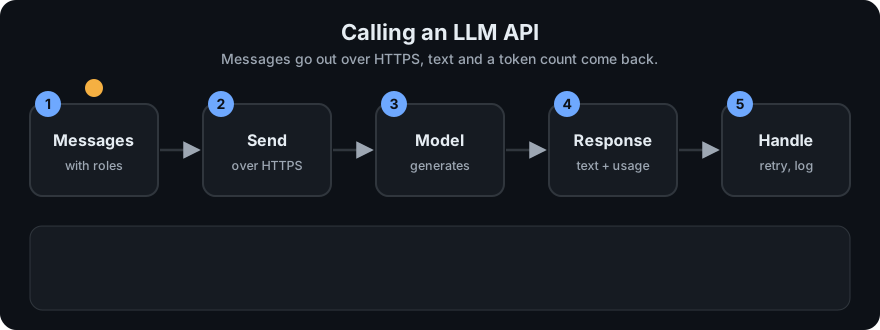
It plays on a loop. Read the caption in the box, one step at a time. Want to go at your own pace? Step through it with Previous and Next.
How it works
- Build messages. A list of
{"role": ..., "content": ...}items. Roles aresystem,userandassistant. The API is stateless, so you send the whole conversation each time. - Set the knobs.
max_tokenscaps the length of the reply.temperaturesets how random it is: low (near 0) for steady answers, higher for more variety. - Send it with a timeout, so a hung request cannot freeze your app.
- Read the response. You get the reply text, a finish reason (it ended on its own, or it hit
max_tokens) and usage (input and output token counts). - Handle errors. HTTP 429 (too many requests) and 5xx (server trouble) are temporary, so retry them. A 400 or 401 (bad request, bad key) will not fix itself, so do not retry.
- Count the cost.
cost = (input_tokens * price_in + output_tokens * price_out) / 1,000,000. Prices are quoted per million tokens and differ for input and output.
flowchart LR
    A[Build messages] --> B[Send with timeout]
    B -->|200 OK| C[Read text, finish reason, usage]
    B -->|429 or 5xx| D[Wait, then retry]
    D -->|attempts left| B
    D -->|none left| E[Raise the error]
    C --> F[Log cost]
Streaming vs non-streaming. A normal call returns when the whole answer is ready. With streaming, the server sends small chunks as they are made, so a chat window can show words right away. The total time is about the same, but the user sees the first words sooner. The cost is more code: you must glue the chunks together and handle an error halfway through.
Never hardcode keys. Put the key in an environment variable (for example os.environ["MY_API_KEY"]) or a secrets manager. Never commit it to Git. Keys in a public repo get scraped within minutes.
Retries, with numbers. With a base delay of 1 second and doubling, the waits are 1, 2, 4 seconds. Real code also adds a little random jitter, so that many clients do not all retry at the same instant. Honour a Retry-After header if the server sends one.
Worked example
Say you send "What is the capital of France?" and the reply uses 12 input tokens and 8 output tokens. With prices of 3.0 per million input tokens and 15.0 per million output tokens:
- Input cost: 12 × 3.0 = 36 (in millionths of a currency unit).
- Output cost: 8 × 15.0 = 120.
- Total: (36 + 120) / 1,000,000 = 0.000156. This is the cost the demo below prints.
- If a call gets a 429, you wait 1 second and retry. A second 429 means waiting 2 seconds. Attempt 3 works, which matches the demo's
attempts 3 waits [1.0, 2.0].
Code example
This demo has no network. FakeLLM returns a dict shaped like a typical response. Real providers use their own field names, so check their docs. Run it: python 03-llm-concepts/code/llm_api_basics.py
from llm_api_basics import FakeLLM, Flaky, retry_with_backoff, cost_estimate

msgs = [
    {"role": "system", "content": "You are a short, polite assistant."},
    {"role": "user", "content": "What is the capital of France?"},
]
llm = FakeLLM()
resp = llm.chat(msgs, max_tokens=50, temperature=0.0)
print(resp["usage"])   # -> {'input_tokens': 12, 'output_tokens': 8}
print(cost_estimate(resp["usage"], 3.0, 15.0))   # -> 0.000156

waits = []
flaky = Flaky(FakeLLM(), fail_first=2)   # first 2 calls fail with 429
retry_with_backoff(lambda: flaky.chat(msgs), attempts=4, base_delay=1.0, sleep=waits.append)
print(flaky.attempts, waits)   # -> 3 [1.0, 2.0]
The prices 3.0 and 15.0 are made-up toy numbers. Look up real ones. The full demo prints:
reply: You said: What is the capital of France?
usage: {'input_tokens': 12, 'output_tokens': 8}
cost : 0.000156
cut off: length | You said: What
attempts: 3 | waits: [1.0, 2.0] | ok: stop
stream: ['You ', 'said', ': Wh', 'at i', 's th', 'e ca', 'pita', 'l of', ' Fra', 'nce?']
Notice cut off: length. With max_tokens=3 the reply stopped mid-sentence, and the finish reason told us so. Always check it. The demo counts one token per word, which is a rough stand-in: real tokenizers split text differently.
The sleep argument is injectable, so the test passes waits.append and runs instantly instead of really waiting. The tests in test_llm_api_basics.py check the exact delays, that a 400-style error is not retried, and that the stream chunks join into the full reply.
In real projects use the official SDK, for example anthropic.Anthropic().messages.create(model=..., max_tokens=..., messages=...) or OpenAI().chat.completions.create(model=..., messages=...). Model names, parameters and built-in retry settings change, so check the docs: the Anthropic Messages API and the OpenAI chat API reference.
When to use it / when not to
| Situation | Advice |
|---|---|
| Quick prototype, low traffic | Call the hosted API directly with the official SDK |
| Answers must appear as they are written | Use streaming |
| Batch jobs, nobody is waiting | Non-streaming, with retries and a spending cap |
| Private data that may not leave your network | Check the provider's data terms, or run a local model |
| Same question asked again and again | Cache the answer instead of paying each time |
| You need a fixed output format | See Structured Outputs |
Common mistakes
- Hardcoding the API key in code or committing it to Git.
- No timeout, so one slow request hangs the whole app.
- Retrying every error, including 400 and 401, or retrying with no delay and making a 429 worse.
- Ignoring the finish reason, and showing a reply that was cut off at
max_tokens. - Forgetting that the API is stateless and that the whole history is billed again on every call.
- Never logging token usage, then getting a surprise bill.
Recap
If you remember only three things:
- The API is stateless: you send the whole conversation on every call.
- Always set a timeout, retry only temporary errors (429, 5xx), and cap the retries.
- Log token usage, because cost is input tokens plus output tokens, each at its own price.
Interview questions
<details> <summary><b>1. The API returns 429 errors during a traffic spike. What do you do?</b></summary>
Retry with exponential backoff and jitter, and respect a Retry-After header if present. Cap the number of attempts. Also reduce the load: queue requests, lower concurrency, or cache repeated questions. Do not retry in a tight loop, because that makes it worse. </details>
<details> <summary><b>2. A chat has 10 turns. Why does the last call cost more than the first?</b></summary>
The API is stateless, so you resend every earlier message as input on each call. Input tokens grow with every turn, and you pay for all of them each time. Fix it by summarizing or trimming old turns. </details>
<details> <summary><b>3. What is the trade-off of streaming?</b></summary>
Users see the first words sooner, so it feels faster, though the total time is about the same. You pay for it in complexity: you assemble chunks, and an error can come after part of the answer was already shown. </details>
Go deeper
- Anthropic Messages API: https://docs.anthropic.com/en/api/messages
- OpenAI chat API reference: https://platform.openai.com/docs/api-reference/chat
- Python
os.environ(reading keys from the environment): https://docs.python.org/3/library/os.html#os.environ - Python
time.sleep: https://docs.python.org/3/library/time.html#time.sleep - Language Models are Few-Shot Learners (GPT-3): https://arxiv.org/abs/2005.14165
Prev: Fine-Tuning (the overview) · Next: Structured Outputs · Back to phase: Phase 3