Structured Outputs
In short: Structured outputs make an LLM return data your code can parse, such as JSON that matches a schema, and you still validate every reply, because even a well-formed answer can be wrong.
On this page
Level: Intermediate · Reading time: 7 min · Phase: 3 · LLM Concepts
Before you start: Calling an LLM API and Hallucinations.
Words to know:
- JSON: a plain-text format for data, like
{"priority": 2}. - Schema: a description of which fields a JSON object must have and what values are allowed.
Explain it like I'm new
Imagine a paper form with boxes: Name, Category (tick one), Priority (1 to 3). A clerk checks it at the desk. If a box is empty or the tick is in the wrong place, the clerk hands it back and says what is wrong.
Free text is like a letter. A human can read it, but your program cannot reliably find the "category" in it. A model might write "Sure! Here is the JSON:" before the data, or call the field type one day and category the next. Structured outputs give you the form, and the validate-and-repair loop is the clerk.
Watch it
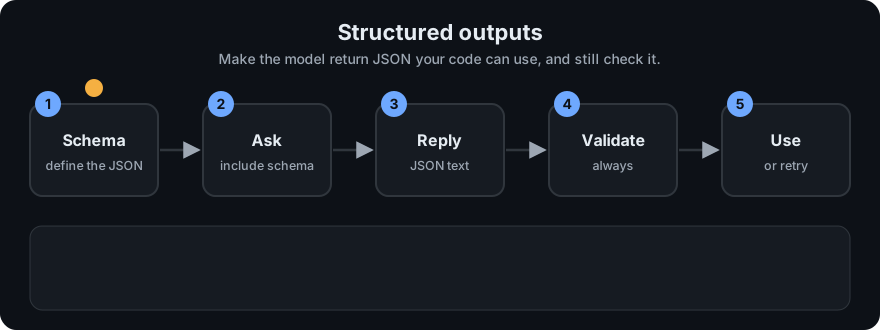
It plays on a loop. Read the caption in the box, one step at a time. Want to go at your own pace? Step through it with Previous and Next.
How it works
- Define a schema. Say which fields exist, their types, which are required, and which values are allowed.
- Ask for it. There are three common ways, from weakest to strongest:
- Prompt only: "Reply with JSON like this." Cheap, but the model can drift.
- JSON mode: the provider makes sure the output is valid JSON. It does not promise your field names.
- Schema-constrained output: you pass a schema, and the provider restricts decoding so the output fits it.
- Tool-call arguments: you describe a "function" with a schema, and the model fills in the arguments. This is the same mechanism agents use. See Tool use in Phase 4.
The exact parameter names and supported schema features differ by provider and change over time. Check the current provider docs.
- Extract. Pull the JSON object out of the reply. If the reply has prose or code fences around it, find the object inside.
- Validate against your schema. Collect a list of errors, not just the first one.
- Repair. If there are errors, send them back to the model: "Your last answer was invalid: ... Return only a corrected JSON object." Stop after a small number of tries.
- Give up cleanly. After the last try, return an error you can log, not a half-valid object.
flowchart LR
    A[Prompt + schema] --> B[LLM reply]
    B --> C[Extract JSON]
    C --> D{Valid?}
    D -->|yes| E[Use the data]
    D -->|no| F[Add errors to prompt]
    F -->|tries left| B
    F -->|no tries left| G[Fail with the errors]
Schema design tips.
- Use an enum for categories (
billing,bug,other), not free text. Add anothervalue, so the model is not forced to guess. - Mark the fields you truly need as required, and keep the schema small.
- Set
minimumandmaximumon numbers (priority 1 to 3). - Give fields clear names, and describe them in the prompt.
What validation cannot do. It checks the shape, not the truth. {"category": "billing", "priority": 1, "tags": ["refund"]} is valid even if the customer was really reporting a bug. Check facts another way: compare to a source, add an evaluation set, or have a human review the risky cases. See Hallucinations for why a confident answer can still be wrong.
Worked example
Ask for a support ticket with category in billing, bug, other and priority 1 to 3:
- Try 1 returns
category: "refund",priority: 7and a wrong tag type. Validation lists all 3 errors. - You send those errors back and ask for a corrected object.
- Try 3 passes every check, so the result
{'category': 'bug', 'priority': 2, 'tags': ['login']}is used. This matches the demo'srepaired result after 3 tries.
Code example
This demo is stdlib only. It has a tiny validator for a subset of JSON Schema (type, required, enum, minimum, maximum, nested objects, array items), not the whole spec. Run it: python 03-llm-concepts/code/llm_structured.py
from llm_structured import TICKET_SCHEMA, ScriptedLLM, extract_json, validate, repair_loop

prose = 'Sure! Here you go: {"category": "bug", "priority": 2, "tags": ["login"]} Hope it helps.'
print(extract_json(prose))   # -> {'category': 'bug', 'priority': 2, 'tags': ['login']}

bad = {"category": "refund", "priority": 7, "tags": ["ok", 5]}
print(validate(bad, TICKET_SCHEMA))
# -> ["$.category: 'refund' not in ['billing', 'bug', 'other']", '$.priority: 7 is above maximum 3', '$.tags[1]: expected string, got int']

llm = ScriptedLLM([
    "I think it is a billing issue, priority high.",
    '{"category": "billing", "priority": 9, "tags": []}',
    '{"category": "billing", "priority": 2, "tags": ["invoice"]}',
])
data, tries, errs = repair_loop(llm, "Classify: I was charged twice.", TICKET_SCHEMA, max_tries=3)
print(data, tries, errs)   # -> {'category': 'billing', 'priority': 2, 'tags': ['invoice']} 3 []
The ScriptedLLM plays back fixed replies: first prose with no JSON, then JSON with a bad priority, then a good answer. The full demo prints:
extracted: {'category': 'bug', 'priority': 2, 'tags': ['login']}
error: $.category: 'refund' not in ['billing', 'bug', 'other']
error: $.priority: 7 is above maximum 3
error: $.tags[1]: expected string, got int
result: {'category': 'billing', 'priority': 2, 'tags': ['invoice']} | tries: 3 | errors: []
second prompt ended with: Return only a corrected JSON object.
third prompt had: - $.priority: 9 is above maximum 3
The error messages are the useful part. The model sees exactly what to fix, and each message carries a path such as $.tags[1]. The tests in test_llm_structured.py check that errors are fed back into the next prompt, that the loop gives up after max_tries, that True is not accepted as an integer, and that a schema-valid but wrong answer passes (shape is not truth).
In real projects you would use a full JSON Schema validator or a data-model library, plus your provider's structured-output feature. Names and parameters change, so check the docs: JSON Schema and the Anthropic tool use guide or the OpenAI function calling guide.
When to use it / when not to
| Situation | Advice |
|---|---|
| Your code reads the answer (classify, extract fields, route a ticket) | Use structured outputs |
| The model must call a function or tool | Use tool-call arguments, and validate them |
| A person reads the answer, and wording matters | Plain text is fine |
| The provider offers schema-constrained decoding | Use it, but still validate |
| Only prompt-based JSON is available | Use validate-then-repair, with a retry limit |
| You need the answer to be true | Validation is not enough. Add retrieval, checks or review |
Common mistakes
- Trusting the output without validating it, even in schema mode.
- Using a free-text field where an enum would do.
- Retrying with the same prompt and no error feedback, and getting the same mistake.
- No retry limit, so a bad prompt loops and burns money.
- Making every field required, so the model invents values for things it does not know. Allow
nullor anothervalue instead. - Assuming a valid shape means a correct answer.
Recap
If you remember only three things:
- A schema plus validation turns free text into data your code can trust in shape.
- Send the list of errors back to the model, and stop after a few tries.
- Validation checks shape, not truth, so a valid answer can still be wrong.
Interview questions
<details> <summary><b>1. What is the difference between JSON mode and schema-constrained output?</b></summary>
JSON mode only guarantees that the output is valid JSON. It does not promise your fields, types or allowed values. Schema-constrained output limits generation to your schema, so the shape matches. Details vary by provider, so check the docs. In both cases, validate in your own code. </details>
<details> <summary><b>2. The model returns valid JSON that passes validation but the content is wrong. Why, and what now?</b></summary>
Validation checks shape, not truth. The model can fill a valid field with a wrong value. Add checks against a trusted source, an evaluation set to measure accuracy, and human review for high-risk cases. </details>
<details> <summary><b>3. Why feed the validation errors back instead of just retrying?</b></summary>
A plain retry often repeats the same mistake. The error list, such as "priority 9 is above maximum 3", tells the model exactly what to fix. Keep the number of tries small, and fail cleanly after that. </details>
Go deeper
- JSON Schema: https://json-schema.org/
- Python
jsonmodule: https://docs.python.org/3/library/json.html - Anthropic tool use: https://docs.anthropic.com/en/docs/build-with-claude/tool-use
- OpenAI function calling: https://platform.openai.com/docs/guides/function-calling
- Toolformer (models learning to call tools): https://arxiv.org/abs/2302.04761
Prev: Calling an LLM API · Next: Quantization · Back to phase: Phase 3