CrewAI
In short: CrewAI organizes several LLM agents as a "crew" where each agent has a role and goal and works through assigned tasks.
On this page
Level: Intermediate · Reading time: 10 min · Phase: 5 — Frameworks
Before you start: You should know what an agent is (What is an AI agent) and the idea of several agents working together (Multi-agent systems).
Explain it like I'm new
Think of a small newsroom. A researcher gathers facts, a writer drafts, an editor checks. Each has a job title and a clear task. CrewAI uses this team metaphor: you describe roles and tasks in plain language, and the framework runs them in order.
It suits workflows that already look like a pipeline of roles. The cost is that every agent is an extra LLM call or many, so runs are slower and pricier than one well-written prompt.
Words to know (check the docs for exact current options):
- Agent — a role, a goal and a backstory, plus optional tools.
- Task — a description of work and its expected output, assigned to an agent.
- Crew — the group of agents and tasks, and how they run.
- Process — the execution style, such as sequential (one after another) or hierarchical (a manager delegates).
- Tool — a function an agent may call.
- Role / goal / backstory — plain-language text that is placed in the agent's prompt to shape how it behaves.
- Context — the earlier output handed to the next agent as input.
Watch it
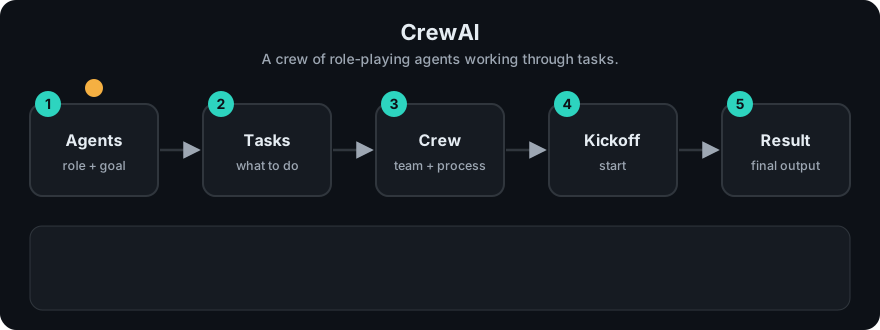
It plays on a loop. Read the caption in the box, one step at a time. Want to go at your own pace? Step through it with Previous and Next.
How it works
- Define agents with roles and goals.
- Define tasks and assign each to an agent.
- Group them in a crew.
- Start the crew. In sequential mode, each task's output becomes context for the next.
flowchart LR
    T1[Task: research] --> A1[Researcher agent] --> T2[Task: write] --> A2[Writer agent] --> T3[Task: edit] --> A3[Editor agent] --> F[final output]
Mapping: this is the multi-agent pattern from Phase 4: specialist agents passing work along. Each agent is an agent loop with its own prompt. Memory is the context handed from task to task.
Worked example
The code example below is a sequential crew with three fake agents. A real agent would call an LLM. Here each one just reports what it did. I ran it. Here is the context at each step.
- Start:
context = ""(empty). - Researcher gets task
collect facts. Context is empty, so it returns[researcher] did 'collect facts' using: nothing. - Writer gets task
draft articleplus the researcher's output as context. It returns[writer] did 'draft article' using: [researcher] did 'collect facts' using: nothing. - Editor does the same with the writer's output. The final printed line is:
[editor] did 'polish draft' using: [writer] did 'draft article' using: [researcher] did 'collect facts' using: nothingYou can read the whole chain of work inside the last line. That is the point of "each task's output becomes context for the next". It is also why one bad early answer is carried to the end. Check the current docs for the exact CrewAI calls.
Code example
From scratch, stdlib only. A sequential crew with fake LLM calls:
def make_agent(role):
    def agent(task, context):
        # a real agent would call an LLM with role + task + context
        return f"[{role}] did '{task}' using: {context or 'nothing'}"
    return agent

crew = [
    (make_agent("researcher"), "collect facts"),
    (make_agent("writer"), "draft article"),
    (make_agent("editor"), "polish draft"),
]

context = ""
for agent, task in crew:
    context = agent(task, context)
print(context)
In real projects: CrewAI is defined with Agent, Task and Crew classes, often configured with YAML files. Its API has changed between versions, so follow the current quickstart: https://docs.crewai.com/
When to use it / when not to
- Use it when your task splits cleanly into roles and you want quick, readable setup.
- Use it for demos and content pipelines.
- Skip it if one agent with tools can do the job. More agents mean more cost and more failure points.
- Skip it when you need exact control over branching and state; use a graph framework.
Common mistakes
- Creating many agents for what is one prompt.
- Vague task descriptions and no expected output.
- No review step, so errors pass down the chain.
- Not logging each agent's output, making failures hard to find.
- Mixing up an agent with a task. The agent is who does the work. The task is what needs doing and what a good result looks like.
Recap
If you remember only three things:
- CrewAI sets up several agents as a crew. Each agent has a role and a goal, and works through the tasks you assign.
- It suits work that splits cleanly into roles, such as research then write then review, and it is quick to read and set up.
- More agents mean more cost and more places to fail. If one agent with tools can do the job, use one.
Interview questions
- What are the three core CrewAI objects? <details><summary>Answer</summary>Agent (role, goal), Task (work and expected output) and Crew (the team and its process).</details>
- Sequential vs hierarchical process? <details><summary>Answer</summary>Sequential runs tasks in a fixed order. Hierarchical adds a manager agent that delegates and reviews.</details>
- When is multi-agent worse than single-agent? <details><summary>Answer</summary>When the task is simple. Extra agents add latency, cost and places for errors without adding ability.</details>
Go deeper
- https://docs.crewai.com/
Prev: OpenAI Agents SDK · Next: AutoGen · Back to phase: Phase 5