Multi Modal RAG
In short: Multi-modal RAG retrieves not just text but also images, tables, charts, audio or video, and gives them to a model that can understand them.
On this page
Level: Advanced · Reading time: 8 min · Phase: 2 — Advanced RAG
Before you start: What is RAG, Embeddings, and Multi Vector Retriever. You should know that RAG finds relevant text and hands it to an LLM, and that embeddings turn content into searchable numbers.
Explain it like I'm new
Ask a mechanic, "Which bolt holds the alternator?" The answer is a diagram in the manual, not a paragraph. A text-only search would never find it, because the picture has no words.
Real documents mix modalities (types of data): text, images, tables, slides, scanned PDFs, screenshots, audio, video. Text-only RAG throws away anything that isn't plain text, or mangles it (tables flattened into word soup). Multi-modal RAG keeps them.
There are three common designs:
- Convert to text: caption images, transcribe audio, turn tables into Markdown, then use normal text RAG. Simple, but loses visual detail.
- Shared embedding space: use a model like CLIP that maps images and text into the same vector space, so a text query can find an image directly.
- Summary + original: embed a text summary or caption for search, but send the original image to a vision-language model (VLM), a model that accepts images in its input. This is the multi-vector pattern applied to images.
Words to know:
- Modality: a type of data, such as text, image, table or audio.
- Caption: a short text description of an image, written by a person or a model.
- OCR (optical character recognition): software that reads the text out of a picture or scan.
- CLIP: a model that puts images and text in the same vector space, so a sentence and a matching picture end up close together.
- VLM (vision-language model): an LLM that accepts images as well as text.
- Parser: a tool that splits a document into its parts (text blocks, tables, figures).
Watch it
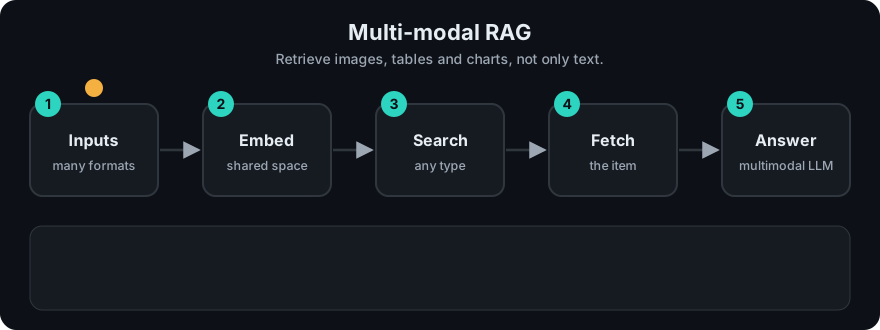
It plays on a loop. Read the caption in the box, one step at a time. Want to go at your own pace? Step through it with Previous and Next.
How it works
- Parse documents into elements: text blocks, tables, figures, page images (layout-aware parsers or OCR).
- Represent each element: text as-is, tables as Markdown or HTML, images as captions and/or image embeddings.
- Index with metadata:
type,page,doc_id, and a link to the original file. - Retrieve with a text query (or an image query).
- Generate with a VLM: pass the question, retrieved text, and the original images.
Worked example
A car manual has three pieces. The question is: "which bolt holds the alternator and what torque". This is design 3 from above (the code below runs it).
- Parse: the manual becomes three elements: a diagram (
p3-fig1), a safety sentence (p3-txt), and a torque table (p7-tbl). - Represent: each gets a text caption. The diagram's caption is "Exploded diagram of the alternator showing the two mounting bolts and belt tensioner."
- Retrieve: the code counts words shared between the question and each caption. The diagram and the torque table share the most words (both mention the alternator and a bolt). The safety sentence shares almost none, so it is left out.
- Generate: the app attaches the original image
manual/p3_fig1.pngand the table text to the prompt for the VLM, which reads the picture and answers.
The caption was only the search handle. The model still sees the real picture.
flowchart LR
    PDF[PDF / slides] --> P[Parser]
    P --> T[Text blocks]
    P --> TB[Tables → Markdown]
    P --> IM[Images]
    IM --> CAP[Caption via VLM]
    T & TB & CAP --> V[(Vector index<br/>+ link to original)]
    Q[Question] --> V --> R[Hits]
    R --> VLM[Vision-language model<br/>gets text + original images]
Code example
A stdlib sketch of design 3: search over captions, return the original asset path to send to a VLM.
import re

ELEMENTS = [
    {"id": "p3-fig1", "type": "image", "path": "manual/p3_fig1.png",
     "caption": "Exploded diagram of the alternator showing the two mounting bolts and belt tensioner."},
    {"id": "p3-txt", "type": "text", "path": None,
     "caption": "Disconnect the battery before any electrical work."},
    {"id": "p7-tbl", "type": "table", "path": "manual/p7_torque.md",
     "caption": "Torque table: alternator bolt 45 Nm, tensioner bolt 25 Nm."},
]

def words(t):
    return set(re.findall(r"[a-z0-9]+", t.lower()))

def retrieve(question, k=2):
    q = words(question)
    ranked = sorted(ELEMENTS, key=lambda e: -len(q & words(e["caption"])))
    return ranked[:k]

for hit in retrieve("which bolt holds the alternator and what torque"):
    print(hit["type"], hit["id"], "->", hit["path"] or "inline text")
The generation step would attach manual/p3_fig1.png as an image and the torque table as text in the prompt.
In real projects you might use CLIP-style models via sentence-transformers (which can embed images and text into one space) or a vector database's multi-modal support, plus a VLM that accepts image input. Check model cards and provider docs for exact image input formats.
When to use it / when not to
- Use it for manuals, slide decks, scientific papers, financial reports, product catalogues, scanned forms.
- Use it when users ask about charts, diagrams or screenshots.
- Start with convert-to-text if most value is in tables and scanned text; it is the cheapest path.
- Avoid it if your content is plain text. It adds parsing complexity and cost.
| Design | Cost | Keeps visual detail |
|---|---|---|
| Convert to text | Low | No |
| Shared embeddings (CLIP) | Medium | For search, yes |
| Caption + original to VLM | Higher | Yes, at answer time |
Common mistakes
- Flattening tables into plain text, so rows and columns get mixed up. Keep Markdown or HTML structure.
- Losing the link from caption back to the original image or page.
- Trusting OCR blindly on low-quality scans. Spot-check.
- Sending dozens of full-resolution images to the VLM; image tokens are expensive.
Recap
If you remember only three things:
- Real documents hold images, tables and scans, and text-only RAG loses them.
- Three designs: convert everything to text, share one embedding space (CLIP), or search captions but send the original image to a VLM.
- Always keep a link from each caption back to its original file, and watch image costs.
Interview questions
1. Name three ways to make images searchable in RAG. <details><summary>Answer</summary> Caption them (or OCR them) and embed the text; embed them directly with a joint image–text model like CLIP; or embed a summary while storing the original and passing it to a vision-language model at answer time. </details>
2. How do you handle tables? <details><summary>Answer</summary> Extract them with a layout-aware parser, keep structure as Markdown or HTML, optionally embed an LLM-written summary for search, and pass the full table to the model. </details>
3. What's the main cost risk? <details><summary>Answer</summary> Ingest-time captioning calls per image and answer-time image tokens. Limit images per answer, downscale, and cache captions. </details>