Human in the Loop
In short: Human in the loop (HITL) means the agent pauses at chosen points so a person can approve, edit, or reject what it is about to do.
On this page
Level: Intermediate · Reading time: 7 min · Phase: 4 · Agentic AI
Before you start: Agent Loops and Function Calling. You should know how the loop runs tools that the model requests.
Explain it like I'm new
At many companies, a junior employee can draft a payment, but a manager must click "approve" before money moves. The junior does the work; the manager signs off on the risky part. That's human in the loop.
Agents make mistakes: wrong tool, wrong arguments, misunderstood goal, or being tricked by injected text. For actions that are cheap and reversible (searching, reading), mistakes don't matter much. For actions that are irreversible or high-impact (sending an email to a customer, deleting files, paying money, merging code), a human check is the most reliable safety net.
Forms of HITL:
- Approve / reject a specific action before it runs.
- Edit the action's arguments (fix the email text) and then run it.
- Answer a question the agent asks when it is unsure ("Which account did you mean?").
- Review the plan before execution starts (Planning Agents).
Words to know:
- Irreversible: cannot be undone once done, like a sent email.
- Gate: a check in your code that must pass before a tool runs.
- Preview: a clear display of what is about to happen, with the exact arguments.
- Approval fatigue: people click yes without reading because they are asked too often.
- Checkpoint: saved state that lets a paused agent resume later.
Watch it
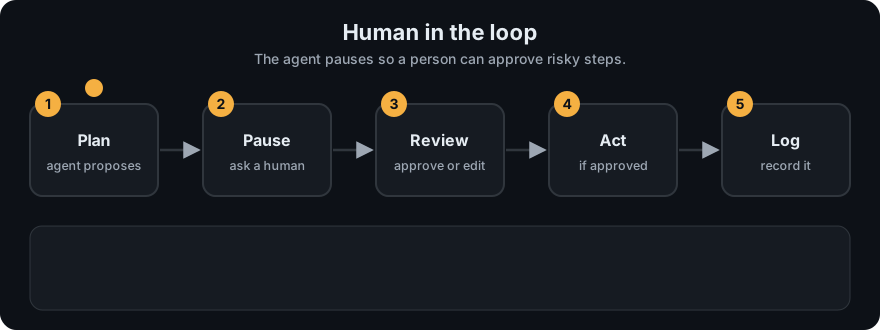
It plays on a loop. Read the caption in the box, one step at a time. Want to go at your own pace? Step through it with Previous and Next.
How it works
- Classify tools by risk in code: read-only, reversible write, irreversible / external.
- When the agent requests a risky tool, pause before running it.
- Show the human a clear preview: what will happen, with what exact arguments, and why.
- The human approves, edits, or rejects.
- Resume: run the (possibly edited) action, or return "rejected by user: <reason>" to the agent as the tool result so it can adjust.
- Log who approved what and when.
sequenceDiagram
    participant Agent
    participant Code as Your code (gate)
    participant Human
    participant Tool as send_email
    Agent->>Code: call send_email(to, body)
    Code->>Code: risky? yes
    Code->>Human: preview: to=..., body=...
    Human-->>Code: approve (or edit / reject)
    Code->>Tool: send_email(...)
    Tool-->>Code: sent
    Code-->>Agent: tool result: "sent"
Worked example
The pipeline from agent_multi.py writes a draft and then wants to run send_email, which is marked risky. Two runs with the same goal (agents and email it), different human answers:
| Human says | What the code does | Real result |
|---|---|---|
| Yes | logs human approved send_email, runs the tool | status done, log ends send_email -> EMAIL SENT: ... |
| No | logs human rejected send_email, skips the tool | status rejected, no email sent |
The draft is written in both runs, because writing text is not risky. Only the irreversible step waits for a person.
For long waits (hours or days), the agent's state must be saved so it can resume later; frameworks call this checkpointing or interrupts.
Code example
From agent_multi.py: the worker asks an approver callback before any tool in risky_tools. Tests pass a stub; the CLI version asks on the console.
def worker(step, draft, guard, approver, log):
    tool = step["tool"]
    guard.check(tool)                              # guardrails first: allowlist + max steps
    if guard.needs_approval(tool):
        preview = draft if step["arg"] is None else step["arg"]
        if not approver(tool, preview):
            log.append(f"human rejected {tool}")
            return draft, False                    # do NOT run the tool
        log.append(f"human approved {tool}")
    out = TOOLS[tool](draft if step["arg"] is None else step["arg"])
    log.append(f"{tool} -> {out}")
    return out, True

def console_approver(tool, preview):
    return input(f"Allow {tool}? Preview: {preview!r} [y/N] ").strip().lower() == "y"
from agent_multi import run_pipeline
res = run_pipeline("agents and email it", approver=lambda tool, preview: False)
print(res["status"]) # rejected -> the email was never sentNote the default is No: if the human just presses Enter, nothing risky happens.
In real projects, LangGraph supports pausing a graph with an interrupt and resuming it later from a checkpoint; see the LangGraph docs for human-in-the-loop.
When to use it / when not to
| Action type | Example | Approval? |
|---|---|---|
| Read-only | search, read file | usually no |
| Reversible write | create draft, add label | optional / batch review |
| Irreversible or external | send email, pay, delete, deploy | yes |
- Use for risky actions, low-confidence decisions, and early in a rollout while you build trust.
- Don't ask for approval on everything. People start clicking "yes" without reading (approval fatigue), which removes the safety benefit.
Common mistakes
- Approval gates written as prompt instructions ("ask the user first") instead of enforced in code.
- Previews that hide the real arguments ("Send email?" without showing the recipient and body).
- Default-yes behaviour on timeout or empty input.
- Not returning the rejection reason to the agent, so it retries the same thing.
- No saved state, so the agent loses its work while waiting for a human.
Recap
If you remember only three things:
- Human in the loop means the agent pauses before risky actions so a person can approve, edit, or reject.
- Enforce the gate in code, show the exact arguments, and make the default answer No.
- Gate only what matters, or people stop reading and approve everything.
Interview questions
1. Which agent actions should require human approval? <details><summary>Answer</summary> Irreversible, external, or high-impact actions: sending messages, spending money, deleting or modifying important data, deploying, or anything with legal or safety impact. Read-only actions usually don't. </details>
2. Why enforce approval in code rather than in the prompt? <details><summary>Answer</summary> A model can ignore or be tricked out of prompt instructions (for example by prompt injection). A code gate around the tool runs regardless of what the model says. </details>
3. What is approval fatigue and how do you avoid it? <details><summary>Answer</summary> When people approve so many prompts that they stop reading them. Avoid it by gating only risky actions, showing clear, concise previews, batching low-risk reviews, and tracking how often approvals are edited or rejected. </details>
Go deeper
Prev: Multi-Agent Systems · Next: Agent Evaluation · Back to phase: Phase 4