Planning Agents
In short: A planning agent first writes a list of steps for the whole task, then executes them one by one, re-planning if something goes wrong.
On this page
Level: Intermediate · Reading time: 8 min · Phase: 4 · Agentic AI
Before you start: ReAct Pattern. You should know the think, act, observe loop and what a tool call is.
Explain it like I'm new
Compare two ways to cook a new dish. One cook reads one line of the recipe, does it, reads the next line, does it (that is like ReAct). Another cook reads the whole recipe first, lays out a plan ("chop everything, boil water, then fry"), and then works through it, adjusting if the shop was out of an ingredient. That second cook is a planning agent.
A plan helps with long tasks because the model doesn't have to keep the whole goal "in its head" at every step. It also gives you something to show a user ("here is what I'm going to do, OK?"). You can log and test it too.
Common names you'll see: Words to know:
- Plan: an ordered list of steps, usually as JSON, so code can read it.
- Plan-and-execute: a planner LLM writes steps; an executor (often a ReAct agent) runs each step.
- Executor: the part that actually carries out each step.
- Guardrail: a rule in code that blocks unsafe or unwanted actions.
- Approval gate: a pause where a human says yes or no before a risky step runs.
- Re-planning: after each step, check results and update the remaining plan.
- Task decomposition: breaking a big goal into smaller sub-goals.
Watch it
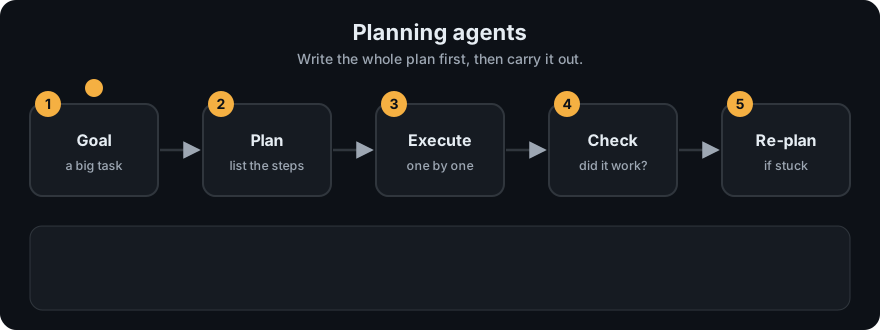
It plays on a loop. Read the caption in the box, one step at a time. Want to go at your own pace? Step through it with Previous and Next.
How it works
- Plan. Ask the model for a list of steps in a structured format (for example JSON:
[{"step": 1, "tool": "...", "goal": "..."}]). - Validate the plan. Check tools exist, the number of steps is reasonable, and risky steps are flagged for approval.
- Execute each step, passing in results from earlier steps.
- Check after each step: did it succeed? Is the plan still valid?
- Re-plan if a step fails or new information changes things.
- Finish by combining results into the final answer.
flowchart TD
    G[goal] --> P[planner LLM: list of steps]
    P --> V{plan valid?}
    V -- no --> P
    V -- yes --> E[execute next step]
    E --> C{step ok?}
    C -- yes, more steps --> E
    C -- failed / new info --> R[re-plan remaining steps] --> E
    C -- all done --> F[final answer]
Example plan for "Write a short report on our top 3 customers by revenue and email it to the sales lead":
[
  {"step": 1, "tool": "sql_query", "goal": "get top 3 customers by revenue this quarter"},
  {"step": 2, "tool": "write_text", "goal": "draft a 200-word report"},
  {"step": 3, "tool": "send_email", "goal": "send to sales lead", "needs_approval": true}
]
Worked example
Goal: "agents and email it". The demo planner in agent_multi.py is rule-based (it looks for the word "email"), but the flow is the same as with an LLM planner. Real output:
>>> planner("agents and email it")
[{'tool': 'write_text', 'arg': 'agents and email it'}, {'tool': 'send_email', 'arg': None}]
>>> planner("agents")
[{'tool': 'write_text', 'arg': 'agents'}]
Trace the first one:
- Plan: two steps,
write_textthensend_email. - Validate: both tools are on the allowed list and there are only two steps, so the plan is accepted.
- Execute step 1:
write_textmakes the draftDraft about agents and email it. - Execute step 2:
send_emailis risky, so it waits for an approver before it runs (the next page shows this in full: see Reflection). - Finish: the pipeline status is
done.
The plan with no email wish has just one step. The plan is decided before any tool runs, which is the difference from ReAct.
Code example
agent_multi.py has a simple rule-based planner (a real one would be an LLM call that returns JSON) and an executor with guardrails:
from agent_multi import planner, run_pipeline

print(planner("agents"))
# [{'tool': 'write_text', 'arg': 'agents'}]
print(planner("agents and email it"))
# [{'tool': 'write_text', 'arg': 'agents and email it'}, {'tool': 'send_email', 'arg': None}]

result = run_pipeline("agents and email it", approver=lambda tool, preview: True)
print(result["status"])     # done
for line in result["log"]:
    print(line)
A plan validator you can add before execution:
def validate_plan(plan, allowed_tools, max_steps=8):
    if not plan or len(plan) > max_steps:
        return "plan is empty or too long"
    for s in plan:
        if s.get("tool") not in allowed_tools:
            return f"unknown tool in plan: {s.get('tool')}"
    return None
In real projects, frameworks like LangGraph let you build plan → execute → re-plan as a graph with explicit state, so you can pause, inspect, and resume.
When to use it / when not to
- Use for long tasks with several distinct parts, when users want to review the plan first, or when you need predictable cost.
- Don't use for short tasks; planning adds an extra model call.
- Plans made before seeing any data can be wrong. Allow re-planning.
| ReAct | Plan-and-execute | |
|---|---|---|
| Decides steps | one at a time | mostly up front |
| Good for | short, exploratory tasks | longer, multi-part tasks |
| Human review | hard (steps appear one by one) | easy (review the plan) |
| Adapts to surprises | naturally | needs re-planning |
Common mistakes
- Treating the first plan as fixed and never re-planning.
- Free-text plans that code can't parse. Ask for JSON and validate it.
- Plans with dozens of tiny steps. Each step is a call, a cost, and a chance to fail.
- Executing risky steps in the plan without a human approval gate.
- Mixing up the plan with the result. A plan is only a promise of what to do, and each step can still fail.
Recap
If you remember only three things:
- A planning agent writes the whole list of steps first, then executes them one by one.
- Plans are made before seeing real data, so allow re-planning when a step fails or something new appears.
- Ask for the plan as JSON, validate it in code, and put risky steps behind human approval.
Interview questions
1. When is plan-and-execute better than ReAct? <details><summary>Answer</summary> For long, multi-part tasks where an overall structure helps, when a human should approve the plan, or when you want more predictable cost. ReAct is better for short, exploratory tasks where each step depends heavily on the last. </details>
2. Why re-plan? <details><summary>Answer</summary> The first plan is made before seeing real data. Tool failures or new information can make later steps wrong or unnecessary, so the agent should update the remaining steps. </details>
3. How do you make an LLM-produced plan safe to execute? <details><summary>Answer</summary> Require structured output, validate it in code (known tools, step limit, argument checks), flag risky steps for human approval, and enforce guardrails during execution regardless of the plan. </details>
Go deeper
- Plan-and-Solve Prompting (Wang et al., 2023)
- Anthropic: Building effective agents
- LangGraph documentation
Prev: ReAct Pattern · Next: Reflection · Back to phase: Phase 4