Multi-Agent Systems
In short: A multi-agent system splits a job across several LLM "agents", each with its own role, prompt, and tools, that pass work between them.
On this page
Level: Advanced · Reading time: 9 min · Phase: 4 · Agentic AI
Before you start: Agent Loops and Reflection. You should know how a single agent loops over tools, and how a critic step improves a draft.
Explain it like I'm new
A newspaper doesn't have one person do everything. An editor plans the stories, reporters write them, and a fact-checker reviews them before print. Each has a narrow job and different tools.
A multi-agent system copies that structure. Common roles:
- Planner (or orchestrator): breaks the goal into tasks and assigns them.
- Workers: each does one kind of task with a small, focused set of tools.
- Critic (or reviewer): checks the output and sends it back if needed (Reflection).
"Agent" here often just means "an LLM call with its own system prompt and tool list". Several agents can even use the same model.
Why split? A single agent with 40 tools and a giant prompt gets confused. Smaller agents with focused prompts are easier to test and improve one at a time. Work can also run in parallel. The price: more model calls, more cost, and more places for things to go wrong.
Words to know:
- Orchestrator: the agent (or code) that splits the job and hands out pieces.
- Worker: an agent that does one kind of task with a small set of tools.
- Critic: an agent that checks a draft and lists problems.
- Handoff: passing work and state from one agent to the next.
- Allowlist: the list of tools an agent may call. Anything else is refused.
- Prompt injection: hidden instructions in text the agent reads, meant to steer it.
Watch it
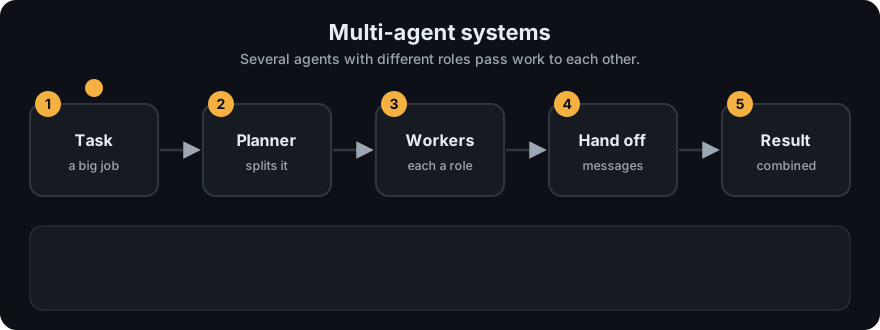
It plays on a loop. Read the caption in the box, one step at a time. Want to go at your own pace? Step through it with Previous and Next.
How it works
Common shapes:
- Pipeline (sequential): planner → worker → critic, each passing its output to the next.
- Orchestrator-workers: a central agent sends subtasks to workers (possibly in parallel) and combines results.
- Supervisor / router: a supervisor picks which specialist handles each step.
- Debate / peer review: agents propose and critique each other's answers.
flowchart LR
    U[goal] --> P[planner]
    P --> W[worker]
    W --> C{critic: problems?}
    C -- yes --> W
    C -- no --> H{risky action?}
    H -- yes --> A[human approval] --> X[execute]
    H -- no --> X
    X --> R[result]
    G[[guardrails: allowlist + max steps]] -. checks every tool call .- W
Worked example
Real output of python agent_multi.py for the goal agents and email it:
plan: ['write_text', 'send_email']
write_text -> Draft about agents and email it.
critic: ['needs a concrete example']
add_example -> Draft about agents and email it. Example: a support bot that looks up orders.
human approved send_email
send_email -> EMAIL SENT: Draft about agents and email it. Example: a support bot that looks up orders.- The planner turns the goal into two steps.
- The worker runs
write_textand produces a short draft. - The critic says the draft needs a concrete example, so the worker revises it with
add_example. send_emailis marked risky, so the code asks a human first. Here the demo approves automatically.- Only then does the email go out.
If the allowlist leaves out send_email, the same run stops at step 4 with status blocked. The email is never sent, because the check is in code.
Design rules:
- Pass structured messages between agents (JSON with fields), not long free text.
- Give each agent the fewest tools it needs.
- Share state explicitly (a shared object or graph state), so you can log and replay.
- Put guardrails and approval gates in code, outside all agents, so no agent can talk its way past them.
Code example
agent_multi.py implements planner → worker → critic with a human approval gate and guardrails, fully offline:
from agent_multi import run_pipeline

def approver(tool, preview):
    print(f"Approve {tool}? -> {preview!r}")
    return True                                   # a real app would ask a person

result = run_pipeline("agents and email it", approver)
print(result["status"])                           # done
for line in result["log"]:
    print(" ", line)
# plan: ['write_text', 'send_email']
# write_text -> Draft about agents and email it.
# critic: ['needs a concrete example']
# add_example -> Draft about agents and email it. Example: a support bot that looks up orders.
# human approved send_email
# send_email -> EMAIL SENT: ...

blocked = run_pipeline("agents and email it", approver, allowed_tools=("write_text", "add_example"))
print(blocked["status"], blocked["log"][-1])      # blocked guardrail: tool 'send_email' is not on the allowlist
The tests in test_agent_multi.py cover reflection, approval rejection, the allowlist, and the step cap.
In real projects, frameworks such as LangGraph (graph of agent nodes with shared state), CrewAI, or AutoGen provide orchestration, state, and interrupts. See Phase 5 · Frameworks.
When to use it / when not to
- Use when a task has clearly different sub-skills (research vs writing vs checking), when parallel work helps, or when a single agent's prompt/tool list has become unmanageable.
- Don't start here. Try one agent with good tools first. Many problems don't need more than one.
| Single agent | Multi-agent | |
|---|---|---|
| Simplicity | high | low |
| Cost per task | lower | higher (more calls) |
| Debugging | easier | harder (handoffs) |
| Specialization | limited | strong |
| Parallelism | limited | natural |
Common mistakes
- Splitting into many agents "because it looks cool", multiplying cost and failure points.
- Unstructured chatter between agents that drifts off task or loops.
- Each agent having all tools, defeating the point of specialization.
- No overall step or budget limit across the whole system.
- Trusting one agent's output as instructions to another without validation (a prompt-injection path).
Recap
If you remember only three things:
- A multi-agent system splits a job into roles (planner, workers, critic) that pass structured results to each other.
- It adds cost and complexity, so start with one agent and split only when you have a clear reason.
- Put guardrails and approvals in the orchestration code, not in any agent's prompt.
Interview questions
1. When would you choose a multi-agent design over a single agent? <details><summary>Answer</summary> When sub-tasks need different prompts, tools, or expertise; when they can run in parallel; or when one agent's context and tool list became too large to work reliably. Otherwise a single agent is simpler and cheaper. </details>
2. Describe an orchestrator-workers pattern. <details><summary>Answer</summary> A central LLM breaks a task into subtasks at run time, delegates each to worker LLM calls (often in parallel), then combines their results. It suits tasks where you can't predict the subtasks in advance. </details>
3. Where should guardrails live in a multi-agent system? <details><summary>Answer</summary> In the orchestration code that executes tools, outside any agent's prompt: tool allowlists per agent, global step and budget limits, argument validation, and human approval for risky actions. Agents can be manipulated; code checks can't be argued with. </details>
Go deeper
- Anthropic: Building effective agents
- AutoGen: Enabling Next-Gen LLM Applications via Multi-Agent Conversation (Wu et al., 2023)
- LangGraph documentation
Prev: Agent Loops · Next: Human in the Loop · Back to phase: Phase 4