Parent Document Retriever
In short: A parent-document retriever searches over small chunks for accuracy, then returns the larger "parent" section each chunk came from, so the LLM gets full context.
On this page
Level: Intermediate · Reading time: 6 min · Phase: 2 — Advanced RAG
Before you start: Parent-Child Chunking and Chunking. This page is the retrieval side of that chunking idea.
Explain it like I'm new
You search a recipe site for "rest the dough for 30 minutes". The site finds that exact sentence. But giving you only that sentence is useless; you need the whole recipe. So the site shows you the full recipe page that contains it. Small piece to find, big piece to read.
Chunk size is a classic RAG dilemma:
- Small chunks (e.g. 1–3 sentences) give sharp embeddings. They match questions precisely. But they lack context: "Set it to 30" — set what?
- Large chunks (e.g. a full section) carry context, but their embedding is a blur of many topics, so they match less precisely.
The parent-document retriever gets both. You split documents into parents (large sections) and each parent into children (small chunks). Only children are embedded. Each child stores its parent_id. Search hits children; you return their parents.
Words to know:
- Chunk: a small piece of a document, cut so it can be embedded and searched.
- Parent: a large chunk (such as a whole section) that gives the LLM full context.
- Child: a small chunk cut from a parent. Children are what you search.
- Embedding: a list of numbers capturing the meaning of text, used to compare it with a question.
- Docstore: a simple store that keeps the parent texts under IDs.
- LLM (large language model): the AI that reads and writes text.
Watch it
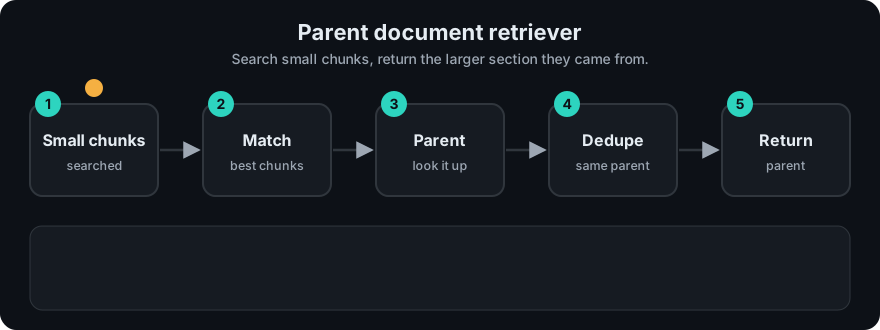
It plays on a loop. Read the caption in the box, one step at a time. Want to go at your own pace? Step through it with Previous and Next.
How it works
- Split each document into parent chunks (e.g. ~2,000 characters, or by heading).
- Split each parent into child chunks (e.g. ~200–400 characters).
- Embed children; store
child_vector → parent_id. - Store parents in a docstore:
parents[parent_id] = text. - Query: search children top k, map to parent IDs, de-duplicate, return parent texts.
Document
├── Parent P1  "Installation" (2,000 chars)  ── stored in docstore
│   ├── child c1  ── embedded → P1
│   ├── child c2  ── embedded → P1
│   └── child c3  ── embedded → P1
└── Parent P2  "Configuration"
    ├── child c4  ── embedded → P2      query hits c5 ─▶ return whole P2
    └── child c5  ── embedded → P2
A variant is sentence-window retrieval: embed single sentences and return the sentence plus N neighbours on each side.
Worked example
The code example has two parent sections, install and config. Each sentence is a child that remembers its parent. Question: "what timeout value".
- Children of
config: "Open settings.yaml.", "Set the port to 8080.", "Set the timeout to 30 seconds." Theinstallchildren are about the installer. - Search children. "Set the timeout to 30 seconds." shares the most words with the question, so it wins (k=1).
- Map to parent. That child belongs to
config. - Return the parent. The real output is
['Open settings.yaml. Set the port to 8080. Set the timeout to 30 seconds.'].
The LLM sees which file to edit, not only the number 30.
Code example
import re

def words(t):
    return set(re.findall(r"[a-z0-9]+", t.lower()))

def build(doc_sections, child_size=1):
    parents, children = {}, []
    for pid, text in doc_sections.items():
        parents[pid] = text
        sentences = re.split(r"(?<=[.!?])\s+", text)
        for i in range(0, len(sentences), child_size):
            children.append((pid, " ".join(sentences[i:i + child_size])))
    return parents, children

def search(question, parents, children, k=2):
    q = words(question)
    ranked = sorted(children, key=lambda c: -len(q & words(c[1])))[:k]
    out = []
    for pid, _ in ranked:
        if parents[pid] not in out:
            out.append(parents[pid])
    return out

sections = {
    "install": "Download the installer. Run it as admin. Restart when asked.",
    "config": "Open settings.yaml. Set the port to 8080. Set the timeout to 30 seconds.",
}
parents, children = build(sections)
print(search("what timeout value", parents, children, k=1))
# ['Open settings.yaml. Set the port to 8080. Set the timeout to 30 seconds.']
The child "Set the timeout to 30 seconds." matched; the LLM receives the full configuration section, including which file to edit.
In real projects LangChain provides a ParentDocumentRetriever (a vector store for children, a docstore for parents, and two text splitters). LlamaIndex supports hierarchical node parsing with an "auto-merging" retriever and a sentence-window approach. See LangChain and LlamaIndex for current imports.
When to use it / when not to
- Use it for structured docs (manuals, policies, READMEs) where sections are natural units.
- Use it when small chunks retrieve well but answers come out incomplete.
- Avoid it if parents are huge. Five 5,000-token parents can blow your context budget.
- Avoid it if documents have no meaningful structure; sentence windows may fit better.
| Chunking | Search precision | Context for LLM |
|---|---|---|
| Small only | High | Low |
| Large only | Low | High |
| Child → parent | High | High (at more tokens) |
Common mistakes
- Not de-duplicating: three children from the same parent return the parent three times.
- Parents so large that only one or two fit in the prompt.
- Splitting parents mid-table or mid-code-block. Split on headings when possible.
- Citing the child instead of the parent (or vice versa) inconsistently. Pick one and keep offsets.
Recap
If you remember only three things:
- Search small child chunks for precision, then return the large parent section for context.
- De-duplicate parents, because several children can point to the same one.
- Keep parents small enough that a few of them fit in the prompt.
Interview questions
1. Why not just use large chunks? <details><summary>Answer</summary> A large chunk's embedding averages many topics, so it matches specific questions less precisely. Small children embed sharply; returning the parent restores context. </details>
2. How does it relate to the multi-vector retriever? <details><summary>Answer</summary> It is a specific multi-vector setup where the extra representations are child chunks of the parent. Multi-vector generalises this to summaries, hypothetical questions, captions and so on. </details>
3. What's sentence-window retrieval? <details><summary>Answer</summary> Embed individual sentences, and at retrieval time return the matched sentence plus a fixed number of surrounding sentences. It's a parent-document variant where the "parent" is a sliding window. </details>
Go deeper
Prev: Multi Vector Retriever · Next: Ensemble Retrieval · Back to phase: Phase 2