FastAPI for AI
In short: FastAPI is a Python web framework that turns your AI function into an HTTP API with automatic input validation and docs.
On this page
Level: Beginner · Reading time: 10 min · Phase: 7 — Production AI
Before you start: Calling an LLM API. You should know basic Python functions and dictionaries.
Explain it like I'm new
Think of a restaurant. The kitchen (your model or RAG pipeline) cooks the food. The waiter (the API) takes orders in a fixed format, passes them to the kitchen, and brings back the plate. Customers never walk into the kitchen.
An API (application programming interface) is a doorway that lets other programs call your code over the network. HTTP is the protocol they use. A client sends a request to a route such as POST /chat, and your server sends back a response, usually JSON (a plain-text format for data, like {"answer": "hi"}).
FastAPI helps with three things. It uses Pydantic models to check that incoming data has the right shape. It builds interactive docs at /docs. And it supports async code, which lets one server handle many slow network calls (like LLM calls) at the same time.
LLM answers can take many seconds. Streaming sends the answer in small pieces as the model produces them, so the user sees text right away.
Words to know: -
Watch it
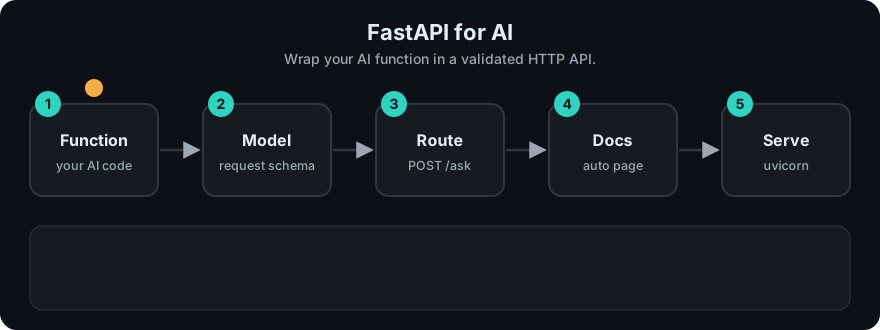
It plays on a loop. Read the caption in the box, one step at a time. Want to go at your own pace? Step through it with Previous and Next.
How it works
- The client sends
POST /chatwith a JSON body. - FastAPI parses the body into a Pydantic model. Bad input gets a
422error automatically. - Your function runs: check cache, retrieve context, call the LLM.
- FastAPI converts the return value to JSON, or streams chunks.
- Middleware and logging record latency and errors.
sequenceDiagram
  participant C as Client
  participant A as FastAPI
  participant L as LLM / RAG
  C->>A: POST /chat {"question": "..."}
  A->>A: validate with Pydantic
  A->>L: call model
  L-->>A: tokens
  A-->>C: JSON or streamed chunks
Worked example
A client sends POST /chat with the body {"question": "What is RAG?"}.
- FastAPI checks the body.
questionis a non-empty string, so it passes. - Your function runs and returns an answer.
- FastAPI replies with status
200and JSON. In the stdlib sketch below the result is{'status': 200, 'answer': '(fake model) You asked: What is RAG?'}.
Now the client sends an empty body {}. There is no question, so validation fails before any model call. The sketch returns {'status': 422, 'error': 'question must be a non-empty string'}. Real FastAPI sends a 422 too, with its own error details. No tokens were spent.
Code example
The core idea, stdlib only: validate input, then call a function. This is what FastAPI automates.
def handle_chat(body: dict) -> dict:
    question = body.get("question")
    if not isinstance(question, str) or not question.strip():
        return {"status": 422, "error": "question must be a non-empty string"}
    answer = f"(fake model) You asked: {question}"
    return {"status": 200, "answer": answer}

print(handle_chat({"question": "What is RAG?"}))
print(handle_chat({}))
In real projects
Install with pip install fastapi uvicorn. Run with uvicorn main:app --reload.
from fastapi import FastAPI
from fastapi.responses import StreamingResponse
from pydantic import BaseModel

app = FastAPI()


class ChatRequest(BaseModel):
    question: str
    max_tokens: int = 300


class ChatResponse(BaseModel):
    answer: str


@app.get("/health")
def health():
    return {"status": "ok"}


@app.post("/chat", response_model=ChatResponse)
async def chat(req: ChatRequest):
    answer = await call_llm(req.question, req.max_tokens)  # your function
    return ChatResponse(answer=answer)


async def token_stream(question: str):
    async for token in call_llm_stream(question):  # your async generator
        yield token


@app.post("/chat/stream")
async def chat_stream(req: ChatRequest):
    return StreamingResponse(token_stream(req.question), media_type="text/plain")
call_llm and call_llm_stream are placeholders for your provider's client. Keep API keys in environment variables. See the FastAPI docs for streaming, dependencies and testing.
When to use it / when not to
- Use it for model-serving APIs, RAG backends and agent endpoints in Python.
- Use
async defwhen you await network calls. Use plaindeffor CPU-bound work; FastAPI runs it in a thread pool. - Do not run heavy model inference inside the request path on a small server. Use a separate worker or a model server.
- For a quick demo UI only, a notebook or Streamlit may be enough.
Common mistakes
- Calling a blocking function (like a sync HTTP client) inside
async def. It freezes all other requests. - No timeout on the LLM call, so requests hang forever.
- No
/healthroute, so Docker and Kubernetes cannot check the service. - Returning raw exception text to users. It can leak internals.
- Loading the model on every request instead of once at startup.
Recap
If you remember only three things:
- FastAPI turns a Python function into an HTTP route and checks input with Pydantic.
- Bad input gets a
422before you spend any tokens. - Use
async, a timeout, a/healthroute and streaming so slow LLM calls do not freeze the server.
Interview questions
1. Why use Pydantic models for an LLM API? <details><summary>Answer</summary>They validate and document input and output. Bad requests fail early with clear errors, before you spend tokens.</details>
2. When does streaming help? <details><summary>Answer</summary>When answers are long. The user sees the first tokens in about the time-to-first-token instead of waiting for the full answer. Total time stays the same.</details>
3. What is wrong with a blocking call inside an async route? <details><summary>Answer</summary>It blocks the event loop, so every other request waits. Use an async client or run the blocking code in a thread.</details>
Go deeper
Prev: Phase 6 — MCP · Next: 02-docker.md · Back to phase: Phase 7