Sliding Window Chunking
In short: Sliding window chunking makes fixed-size windows of text that move forward by a smaller step, so every border region appears inside at least one full window.
On this page
Level: Beginner · Reading time: 6 min · Phase: 1 — RAG Foundations
Before you start: Chunking and Recursive Chunking. You should know that a long document is cut into smaller pieces (chunks) before search.
Explain it like I'm new
Imagine reading a long scroll through a cardboard frame that shows 10 lines. You read, then slide the frame down by 5 lines, and read again. Every line is seen at least once, and lines near the edge of one view are in the middle of the next. That frame is the window. How far you slide it is the stride (or step).
Words to know:
- Chunk: one small piece of a document that is stored and searched on its own.
- Token: a small piece of text (often a word or part of a word) that a language model reads as one unit.
- Window size: how many words or tokens each chunk holds.
- Stride: how far the next window starts after the previous one.
- Overlap: window − stride. With window 10 and stride 5, neighbours share 5 units.
- Top-k: the k best-matching chunks a search returns.
This fixes a real problem with simple cutting. If an important sentence lands on the border between two chunks, each chunk gets only half. With a sliding window, some window contains the whole sentence.
Sliding windows are fixed-size chunking with overlap, usually counted in words or tokens instead of characters.
Watch it
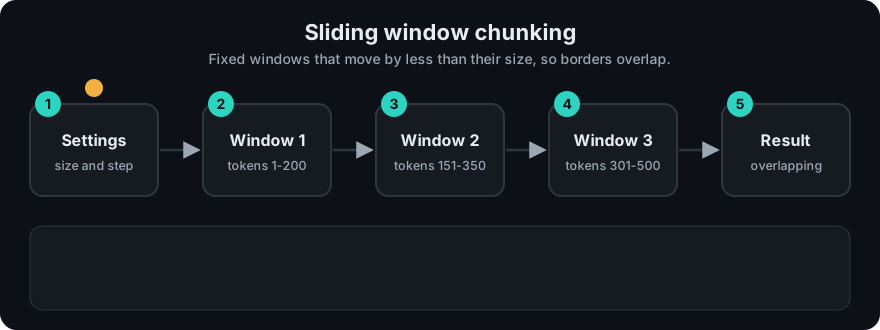
It plays on a loop. Read the caption in the box, one step at a time. Want to go at your own pace? Step through it with Previous and Next.
How it works
- Split the text into units (words or tokens).
- Take units
0 … window−1as chunk 1. - Move the start forward by
strideand take the next window. - Stop when a window reaches the end of the text.
words:   w0 w1 w2 w3 w4 w5 w6 w7 w8 w9
window=4, stride=2
chunk 1: [w0 w1 w2 w3]
chunk 2:       [w2 w3 w4 w5]
chunk 3:             [w4 w5 w6 w7]
chunk 4:                   [w6 w7 w8 w9]
Worked example: 1,000 tokens, window 200, stride 150 (overlap 50). Windows start at 0, 150, 300, 450, 600, 750 and 900. Window 750 ends at token 950, so one more window (900) is needed to reach the end. That is 7 chunks. With stride 200 (no overlap) windows start at 0, 200, 400, 600, 800: 5 chunks. Here, overlap costs 2 extra chunks (40% more).
Worked example
Take the 10 words w0 … w9 from the diagram above with window 4 and stride 2. The overlap is 4 − 2 = 2 words.
- Chunk 1 starts at word 0 and holds
w0 w1 w2 w3. - Move forward by the stride (2). Chunk 2 starts at word 2 and holds
w2 w3 w4 w5. - Chunk 3 starts at word 4:
w4 w5 w6 w7. Chunk 4 starts at word 6:w6 w7 w8 w9. - Chunk 4 reaches the last word, so we stop. That is 4 chunks.
Now say the key fact is the pair w3 w4. A plain cut into w0-w3 and w4-w7 splits that pair across two chunks. Chunk 2 above holds both words together, so a search can find the whole fact.
Code example
From code/rag_chunkers.py:
def sliding_window_chunks(text, window=50, stride=25):
    words = text.split()
    chunks = []
    for start in range(0, len(words), stride):
        chunks.append(" ".join(words[start:start + window]))
        if start + window >= len(words):
            break
    return chunks

text = " ".join(str(i) for i in range(10))
print(sliding_window_chunks(text, window=4, stride=2))
# ['0 1 2 3', '2 3 4 5', '4 5 6 7', '6 7 8 9']
In real projects most splitters express this as chunk_size + chunk_overlap. Token-based (pip install langchain-text-splitters tiktoken):
from langchain_text_splitters import TokenTextSplitter

splitter = TokenTextSplitter(chunk_size=200, chunk_overlap=50)   # stride = 150 tokens
chunks = splitter.split_text(long_text)
When to use it / when not to
- Good for text with weak structure: transcripts, logs, OCR output, chat exports.
- Good when you must not miss facts near borders.
- Less good for well-structured docs. Cutting by headings or paragraphs (recursive) gives cleaner chunks.
- Big overlap means more storage, more embedding cost and near-duplicate search results.
| Overlap | Pros | Cons |
|---|---|---|
| 0% | Fewest chunks | Border facts get split |
| 10–20% | Common balance | Some duplication |
| 50% | Very safe | About 2× chunks, many near-duplicates |
Common mistakes
- Stride larger than window, which skips text entirely.
- Returning several near-identical windows in the top-k and wasting the prompt. Deduplicate or merge neighbours.
- Counting in characters and cutting words in half.
- Forgetting to store each window's start position, which you need for citations and merging.
Recap
If you remember only three things:
- A sliding window cuts text into fixed-size chunks and moves forward by a stride smaller than the window.
- Overlap = window − stride, and it keeps facts near a border whole in at least one chunk.
- More overlap means more chunks to store and more near-duplicate search results.
Interview questions
1. How do window size and stride relate to overlap? <details><summary>Answer</summary> Overlap equals window minus stride. Stride equal to window means no overlap; stride smaller than window means neighbours share text. </details>
2. Why use overlap at all? <details><summary>Answer</summary> So that information near a chunk border appears whole in at least one chunk, which improves recall for facts that would otherwise be split. </details>
3. What is the downside of a large overlap? <details><summary>Answer</summary> More chunks to embed and store, higher cost, and duplicate results that crowd out other relevant chunks in the top-k. </details>
Go deeper
- LangChain text splitters — https://python.langchain.com/
Prev: Parent Child Chunking · Next: Metadata · Back to phase: Phase 1