MLflow
In short: MLflow is an open-source tool that records your experiments (settings, scores, files) so you can compare runs and reproduce the best one.
On this page
Level: Intermediate · Reading time: 8 min · Phase: 7 — Production AI
Before you start: LangSmith and Chunking. You should know that RAG splits documents into chunks, and that a score is a number you measure.
Explain it like I'm new
Imagine a cooking notebook. Every time you try a recipe you write the ingredients, the oven temperature and how it tasted. Later you can say "the version with less salt at 180°C was best."
Without notes, AI work becomes chaos: "Which chunk size gave that good score last Tuesday?" MLflow is the notebook.
Words to know:
- Run: one try (one training, or one evaluation of your RAG pipeline).
- Parameter: an input setting, like
chunk_size=500. - Metric: a number result, like
hit_rate=0.82. It can be logged over time. - Artifact: a file you keep, such as a plot or a prompt file.
- Experiment: a group of related runs.
- Model registry: a place to version and promote models.
- Hit rate: the share of test questions where retrieval found the right chunk. 0.82 means 82 out of 100.
- Reproduce: run the same settings again and get the same result. You can only do this if you wrote the settings down.
MLflow started with classic machine learning and also has features for LLM apps (tracing, evaluation). Check the MLflow docs for current GenAI features.
Watch it
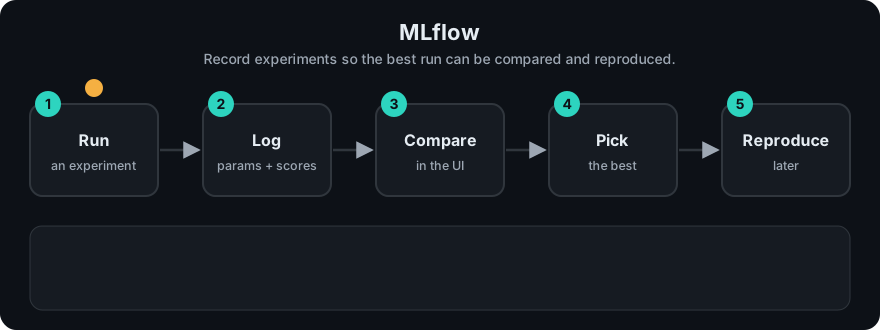
It plays on a loop. Read the caption in the box, one step at a time. Want to go at your own pace? Step through it with Previous and Next.
How it works
- Start a run.
- Log parameters (what you changed).
- Log metrics (what you measured).
- Log artifacts (files).
- Open the UI and compare runs in a table or chart.
flowchart LR
  E[Experiment: rag-tuning] --> R1[Run 1: chunk 300]
  E --> R2[Run 2: chunk 500]
  E --> R3[Run 3: chunk 800]
  R1 --> M[Compare metrics in UI]
  R2 --> M
  R3 --> M
Worked example
You want to pick a chunk size for a RAG app. You try three sizes on the same 100 test questions. Each try is one run, and you log one parameter and one metric. These are the demo's made-up scores:
| Run | Parameter chunk_size | Metric hit_rate |
|---|---|---|
| 1 | 300 | 0.71 |
| 2 | 500 | 0.82 |
| 3 | 800 | 0.76 |
The highest hit rate is 0.82, so run 2 wins. Running the mini-tracker below prints the real result:
best: {'chunk_size': 500} {'hit_rate': 0.82}Because the parameter was logged next to the metric, you know which setting produced 0.82 and can use it again.
Code example
A stdlib mini-tracker with the same shape as MLflow's API:
runs = []

class Run:
    def __init__(self): self.params, self.metrics = {}, {}
    def log_param(self, k, v): self.params[k] = v
    def log_metric(self, k, v): self.metrics[k] = v

def fake_eval(chunk_size):
    return {300: 0.71, 500: 0.82, 800: 0.76}[chunk_size]   # made-up demo scores

for size in (300, 500, 800):
    run = Run()
    run.log_param("chunk_size", size)
    run.log_metric("hit_rate", fake_eval(size))
    runs.append(run)

best = max(runs, key=lambda r: r.metrics["hit_rate"])
print("best:", best.params, best.metrics)
In real projects
pip install mlflow, then:
import mlflow

mlflow.set_experiment("rag-tuning")

for chunk_size in (300, 500, 800):
    with mlflow.start_run():
        mlflow.log_param("chunk_size", chunk_size)
        score = evaluate_pipeline(chunk_size)        # your function
        mlflow.log_metric("hit_rate", score)
Run mlflow ui and open the address it prints to compare runs. By default results are stored in a local mlruns folder; teams usually point to a shared tracking server. See the MLflow docs.
When to use it / when not to
- Use it to compare chunk sizes, embedding models, prompts and retrieval settings with real numbers.
- Use it when you train or fine-tune models and need a registry.
- For a handful of experiments, a spreadsheet works. Do not add a server you will not maintain.
- For per-request production debugging, use tracing (topics 8 and 13).
Common mistakes
- Logging metrics but not the parameters, so you cannot reproduce the run.
- Changing the evaluation set between runs, which makes comparisons meaningless.
- Not logging the code version (Git commit) or prompt version.
- Running a tracking server with no access control on a public address.
- Chasing tiny score differences on a very small eval set.
Recap
If you remember only three things:
- A run is one try. You log its parameters (inputs you chose) and its metrics (numbers you measured).
- Logging both lets you compare runs and reproduce the best one.
- Compare on the same eval set, or the comparison means nothing.
Interview questions
1. Parameter vs metric? <details><summary>Answer</summary>A parameter is an input you choose. A metric is a measured result.</details>
2. Why track experiments? <details><summary>Answer</summary>To compare options fairly and reproduce the best result later.</details>
3. How would you use MLflow for RAG? <details><summary>Answer</summary>Log chunk size, embedding model, top-k and prompt version as parameters, and retrieval hit rate and answer quality scores as metrics, on a fixed eval set.</details>
Go deeper
Prev: 08-langsmith.md · Next: 10-prompt-versioning.md · Back to phase: Phase 7