MCP Server
In short: An MCP server is a program that exposes tools, resources and prompts to MCP clients over a transport such as stdio.
On this page
Level: Beginner · Reading time: 11 min · Phase: 6 — MCP
Before you start: Model Context Protocol. You should know that MCP joins an AI app (client) to tools and data (server).
Explain it like I'm new
A server is like a restaurant kitchen with a menu. The menu lists what you can order (tools, resources, prompts). The client is the waiter who carries orders in and dishes out. The kitchen does the real work and does not care which diner asked.
In MCP, "server" does not mean a big machine in the cloud. Most servers are small programs that run on your laptop. The host starts them as child processes and talks to them through stdin and stdout. That is the stdio transport.
Words to know:
- Server: the program that offers tools, resources and prompts. It waits for messages and answers them.
- Capability: a feature the server says it supports. A client should only use what was declared.
- Notification: a message with no
id. Nobody replies to it. - stdio: the server reads messages from standard input and writes replies to standard output. The host starts it as a child process.
Watch it
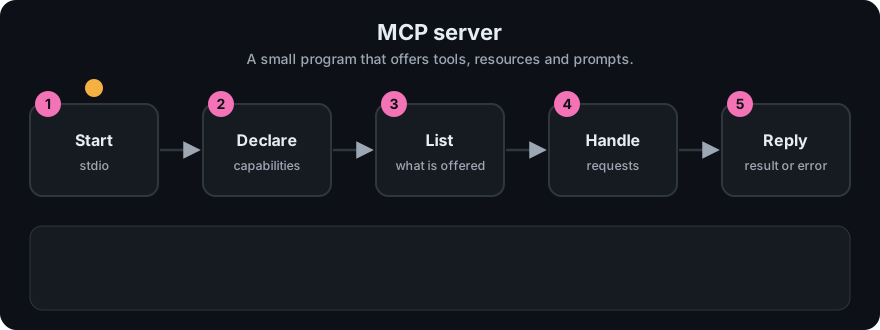
It plays on a loop. Read the caption in the box, one step at a time. Want to go at your own pace? Step through it with Previous and Next.
How it works
- The server starts and waits for messages.
- It receives
initializewith the client's protocol version and capabilities. - It replies with its own version, capabilities (which primitives it supports) and
serverInfo. - It receives the
notifications/initializednotification. A notification has noidand gets no reply. - It now answers
tools/list,tools/call,resources/list,resources/read,prompts/list,prompts/get. - Capabilities decide what is allowed. If the server did not declare
tools, the client should not call tools.
Two transports
| stdio | Streamable HTTP | |
|---|---|---|
| Where it runs | Local child process of the host | Anywhere: local or remote |
| Message path | JSON-RPC lines on stdin/stdout | HTTP POST (and optional streaming) to one endpoint |
| Auth | Inherits your user permissions; credentials via env vars | HTTP-level auth; the spec describes OAuth-based authorization |
| Good for | Personal tools, files, dev | Shared or hosted services |
Streamable HTTP replaced the older HTTP+SSE transport. Check the transports page in the current spec for details.
sequenceDiagram
  participant C as Client
  participant S as Server
  C->>S: initialize (version, capabilities)
  S-->>C: result (version, capabilities, serverInfo)
  C->>S: notifications/initialized
  C->>S: tools/list
  S-->>C: result (tools)
Stdio rule: stdout is the protocol channel. Never print() or console.log() there. Log to stderr.
Worked example
Here is what a server does for the first two messages. The lines are real output of the toy in code/mcp_mini_jsonrpc.py.
- Client sends
initializewithid1. The server replies with the sameidand lists what it supports:tools,resourcesandprompts. - Client sends
notifications/initialized. It has noid, so the server stays silent. - Client sends
tools/listwithid2. The server answers withadd_numbersandword_count.
The order matters. If a client sends tools/list before the handshake is finished, the toy server replies with an error: code -32600, "Server not initialized".
Code example
The real server in this repo is code/hello-mcp-server/src/index.ts. Its skeleton:
import { McpServer } from "@modelcontextprotocol/sdk/server/mcp.js";
import { StdioServerTransport } from "@modelcontextprotocol/sdk/server/stdio.js";

const server = new McpServer({ name: "hello-mcp-server", version: "1.0.0" });
// ... server.registerTool(...) calls go here ...
await server.connect(new StdioServerTransport());
console.error("hello-mcp-server running on stdio"); // stderr, not stdout
The Python version that runs offline is code/mcp_mini_jsonrpc.py. Its MiniMcpServer.handle() takes one JSON string and returns one JSON string (or None for notifications).
SDK version note. I ran this snippet against the official
mcpPython package, version 2.3.0 (pip install mcp). In 1.x versions the same class was calledFastMCPand lived inmcp.server.fastmcp. The decorators (@tool(),@resource(),@prompt()) are the same. If you pinmcp<2, usefrom mcp.server.fastmcp import FastMCP. Check the SDK docs for your version.
In real projects (official mcp Python SDK):
from mcp.server.mcpserver import MCPServer

mcp = MCPServer("hello")

@mcp.tool()
def add_numbers(a: float, b: float) -> float:
    """Add two numbers and return the sum."""
    return a + b

if __name__ == "__main__":
    mcp.run()  # stdio by default
When to use it / when not to
- Write a server when you want the same capability in many AI apps.
- Write a server to wrap an internal API with safe, narrow tools.
- Do not expose a whole database or a raw shell. Expose small, specific actions.
- Prefer stdio for personal use. Use Streamable HTTP when many users need one hosted server.
Common mistakes
- Logging to stdout, which corrupts the JSON-RPC stream.
- Skipping input validation. The model can send bad arguments.
- Declaring capabilities you do not implement.
- Running a remote server with no authentication.
- Forgetting that a notification gets no reply. If you wait for one, your client will hang.
- Logging to stdout in a stdio server. Stdout carries the protocol messages, so a stray
printcorrupts them. Log to stderr or a file.
Recap
If you remember only three things:
- A server is a program that answers JSON-RPC messages about its tools, resources and prompts.
- Start with
initialize, thennotifications/initialized. After that the list and call methods work. - stdio is for local tools run by the host. Streamable HTTP is for shared or remote servers.
Interview questions
- What happens during initialization?
<details><summary>Answer</summary>The client sends initialize with its version and capabilities. The server replies with its version, capabilities and info. The client then sends notifications/initialized.</details>
- Why must a stdio server not write logs to stdout?
<details><summary>Answer</summary>stdout carries the JSON-RPC messages. Extra text breaks parsing. Use stderr.</details>
- stdio vs Streamable HTTP?
<details><summary>Answer</summary>stdio is a local child process. Streamable HTTP runs over HTTP and suits remote, shared servers that need real authorization.</details>
Go deeper
Prev: 01-model-context-protocol.md · Next: 03-mcp-client.md · Back to phase: Phase 6