MCP Resources
In short: Resources are read-only data a server exposes, each identified by a URI, which the host application chooses to load into context.
On this page
Level: Intermediate · Reading time: 9 min · Phase: 6 — MCP
Before you start: MCP tools. You should know what a tool is, so you can tell it apart from a resource.
Explain it like I'm new
A resource is a book on a library shelf. The librarian (the application) decides which books to put on your desk. The reader (the model) does not walk the shelves on its own. This is application-controlled.
A URI is just an address, like file:///notes/todo.md or notes://welcome. The server picks the scheme. Resources can be files, database rows, logs, API responses or anything readable.
Words to know:
- Resource: read-only data the server exposes, such as a file, a note or a database row.
- URI: a name for one resource, like
notes://welcome. - MIME type: a label for the kind of content, such as
text/plain. - Context: the text the model can see right now. A loaded resource is added to it.
Watch it
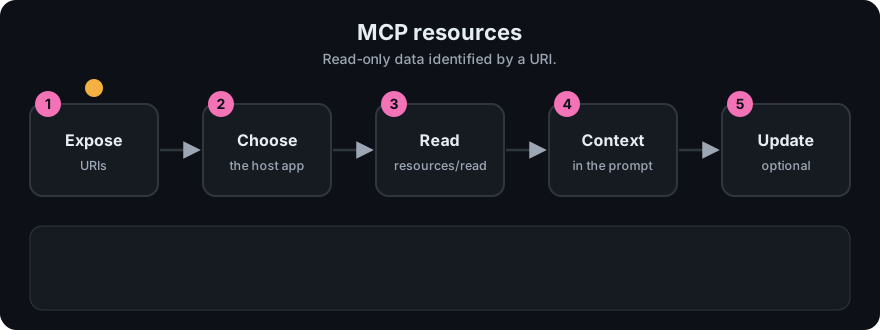
It plays on a loop. Read the caption in the box, one step at a time. Want to go at your own pace? Step through it with Previous and Next.
How it works
- Server declares the
resourcescapability. - Client sends
resources/list; server returns items withuri,name, and oftenmimeType. - The host (or the user, through a picker) selects some.
- Client sends
resources/readwith theuri. - Server returns
contents: a list of items withuri,mimeTypeandtext(orblobfor binary).
{"jsonrpc":"2.0","id":3,"method":"resources/read","params":{"uri":"notes://welcome"}}

{"jsonrpc":"2.0","id":3,"result":{"contents":[
  {"uri":"notes://welcome","mimeType":"text/plain","text":"Hello from a resource."}]}}
Resource templates describe a family of URIs, such as notes://{title}, so a server need not list every item. Servers can also notify clients when a resource list or content changes, if they declare those capabilities. Check the resources page of the spec for the exact capability flags.
flowchart LR
  S[Server: resources/list] --> H[Host shows picker]
  H -->|user or app chooses| R[resources/read]
  R --> CTX[Text added to model context]
Tool or resource?
| Tool | Resource | |
|---|---|---|
| Controlled by | Model | Application |
| Has side effects | Often | No (read-only) |
| Takes arguments | Yes (schema) | Only via URI / template |
| Example | create_note | notes://welcome |
Worked example
Reading one resource from the toy server.
resources/listreturns one item: URInotes://welcome, nameWelcome, typetext/plain.- The host shows it in a picker, or decides on its own to attach it.
- The client sends
resources/readwith thaturi. - The server returns
contentswith the textHello from a resource. - The host adds that text to the conversation, so the model can use it.
No model decision happened anywhere. The app or the user chose the data. That is the key difference from a tool, where the model chooses.
Code example
Using the offline toy (code/mcp_mini_jsonrpc.py):
print(client.list_resources())
# [{'uri': 'notes://welcome', 'name': 'Welcome', 'mimeType': 'text/plain'}]
print(client.read_resource("notes://welcome")[0]["text"])
Reading an unknown URI returns a JSON-RPC error (the toy uses code -32002; check the spec for the current code).
In real projects (TypeScript SDK; same package as the hello server, but not used in that file. Check the SDK docs for your version):
server.registerResource(
  "welcome",
  "notes://welcome",
  { title: "Welcome note", mimeType: "text/plain" },
  async (uri) => ({ contents: [{ uri: uri.href, text: "Hello from a resource." }] })
);
Python equivalent (mcp 2.x MCPServer, called FastMCP in 1.x):
@mcp.resource("notes://welcome")
def welcome() -> str:
    return "Hello from a resource."
When to use it / when not to
- Use resources for documents, configs and reference data you want the app to attach.
- Do not hide side effects in a resource read. Use a tool.
- Do not serve secrets as resources. Anything loaded into context may be echoed.
- Validate URIs. A path-like URI must not escape its allowed folder.
Common mistakes
- Using resources when the model needs to query on demand (a tool fits better).
- Path traversal:
file:///../../etc/passwd. - Returning very large files with no limit.
- Assuming every client supports resources. Support varies, so check your host.
- Using a resource for something that changes the world. Resources are read-only data. Actions belong in tools.
- Asking for a URI the server never listed. The server answers with an error.
Recap
If you remember only three things:
- Resources are read-only data, each named by a URI.
- The app or user picks them. The model does not call them.
- Use a resource for data to read, and a tool for an action to perform.
Interview questions
- Who controls resources?
<details><summary>Answer</summary>The application. It (or the user via UI) decides what to load, not the model.</details>
- What does
resources/readreturn?
<details><summary>Answer</summary>A contents array with uri, mimeType and text or blob.</details>
- Resource vs tool?
<details><summary>Answer</summary>Resources are read-only data selected by the app. Tools are actions the model chooses to run.</details>
Go deeper
Prev: 04-mcp-tools.md · Next: 06-mcp-prompts.md · Back to phase: Phase 6