DSPy
In short: DSPy lets you declare what an LLM step should do (inputs and outputs) as code, then uses an optimizer to find good prompts instead of you hand-writing them.
On this page
Level: Advanced · Reading time: 11 min · Phase: 5 — Frameworks
Before you start: You should know what a prompt is and why wording matters (Prompt engineering). It also helps to know that we measure quality with a score (Agent evaluation).
Explain it like I'm new
Hand-tuned prompts are like hand-tuned engine settings: they work for one car on one day. Change the model and they break. DSPy treats prompts like model weights: you give examples and a score, and it searches for better instructions or few-shot examples.
You write a signature, a typed contract such as "question -> answer". You wrap it in a module. An optimizer then tunes the prompt against a metric you define.
Words to know:
- Signature — declares input and output fields of an LLM call.
- Module — a reusable piece that uses a signature (for example
Predict, or a reasoning variant). - Metric — a function that scores an output (exact match, a judge, a check).
- Optimizer — a procedure that tries prompt variants or examples and keeps what scores best.
- Trainset — labelled examples for optimizing.
- Few-shot examples — a few sample question-and-answer pairs placed in the prompt to show the model what you want.
- Overfitting — doing well on the examples you tuned on, but badly on new ones.
- Validation set — examples kept aside, never used for tuning, to check the result honestly.
Watch it
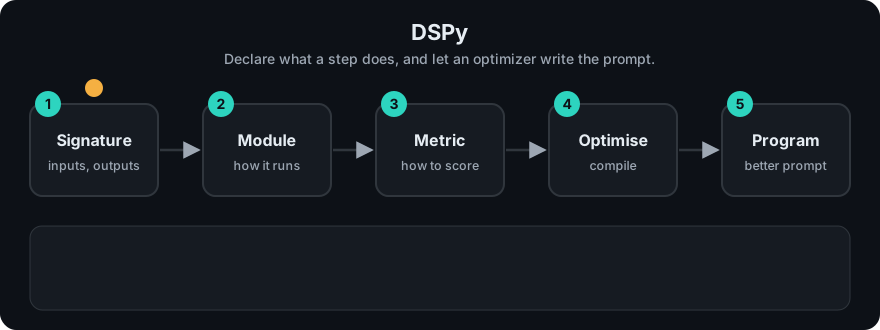
It plays on a loop. Read the caption in the box, one step at a time. Want to go at your own pace? Step through it with Previous and Next.
How it works
- Write a signature and a module.
- Prepare a small trainset and a metric.
- Run an optimizer. It tries candidate prompts or demos and scores each on the trainset.
- Keep the best-scoring program and save it.
flowchart LR
    S[signature + module] --> O[optimizer]
    D[trainset] --> O
    M[metric] --> O
    O --> B[best prompt/demos] --> P[compiled program]
Mapping: the optimizer loop is the evaluation habit from Phase 3 and Phase 7 made automatic: measure, change, measure again. It can tune the generation step of a RAG pipeline from Phase 1.
Worked example
The code example below is a tiny optimizer. It tries two instructions and keeps the one that scores best. The fake model obeys a keyword: if the instruction says "brief" it returns just the last word, otherwise it adds "The answer is". Here is the work by hand (it is small enough to check, and I also ran it).
Trainset: ("capital of France Paris", "Paris") and ("largest planet Jupiter", "Jupiter"). Metric: the output must equal the expected answer exactly.
| Instruction | Output for question 1 | Output for question 2 | Score |
|---|---|---|---|
Be verbose. | The answer is Paris (no match) | The answer is Jupiter (no match) | 0 of 2 |
Be brief. | Paris (match) | Jupiter (match) | 2 of 2 |
The optimizer keeps Be brief. The metric defined "good", so the optimizer pushed toward it. If the metric had accepted any answer containing the right word, Be verbose. would also have scored 2 and the choice would have been a tie. Check the current docs for exact DSPy classes.
Code example
From scratch, stdlib only: pick the best instruction by score on a tiny trainset. The "model" is a fake that obeys keywords.
def fake_model(instruction, question):
    if "brief" in instruction:
        return question.split()[-1]       # short answer
    return "The answer is " + question.split()[-1]

trainset = [("capital of France Paris", "Paris"), ("largest planet Jupiter", "Jupiter")]
metric = lambda pred, gold: pred == gold

candidates = ["Be verbose.", "Be brief."]

def score(instruction):
    return sum(metric(fake_model(instruction, q), a) for q, a in trainset)

print(max(candidates, key=score))   # Be brief.
In real projects (pip install dspy, needs a configured LM):
import dspy

dspy.configure(lm=dspy.LM("openai/gpt-4o-mini"))
qa = dspy.Predict("question -> answer")
print(qa(question="What is the capital of France?").answer)
Optimizers and typed class-based signatures are covered in the docs.
When to use it / when not to
- Use it when you have a metric and examples, and prompt quality matters across model changes.
- Use it for multi-step pipelines where hand-tuning each prompt is slow.
- Skip it with no labelled data or no way to score output; an optimizer needs both.
- Skip it for one-off prompts. Writing the prompt by hand is faster.
Common mistakes
- A weak metric. The optimizer will improve exactly what you measure, even if it is wrong.
- Too few examples, so it overfits the trainset.
- Not holding out a validation set.
- Expecting it to fix bad retrieval or bad data.
- Mixing up prompt engineering with optimizing. Engineering is you editing wording by hand. DSPy searches for wording by score, so you must supply the score.
Recap
If you remember only three things:
- With DSPy you declare what a step should do (its inputs and outputs) and an optimizer searches for good prompts for you.
- It needs two things: examples and a metric that scores the output. Without them the optimizer has nothing to improve.
- For a one-off prompt, writing it by hand is faster. DSPy pays off in multi-step pipelines and when you change models.
Interview questions
- What is a DSPy signature? <details><summary>Answer</summary>A declaration of an LLM step's input and output fields, such as "question -> answer", separate from the prompt text.</details>
- How is DSPy different from LangChain? <details><summary>Answer</summary>LangChain composes components; you write the prompts. DSPy generates and optimizes prompts from a signature, examples and a metric.</details>
- Why does the metric matter most? <details><summary>Answer</summary>The optimizer maximizes it. A metric that does not match real quality produces prompts that score well and work badly.</details>
Go deeper
- https://dspy.ai/